How To Make A Reel in 2026
Making a reel in 2026 is faster than ever, but the format choices that get views have changed. Here's the full step-by-step, plus what's actually working right now.

Jaife Esienna
Co-Founder of Virlo
Jaife Esienna is a co-founder of Virlo, where he helps ecommerce brands, GTM teams, and marketing agencies turn viral short-form video data into seven-figure content strategies. He writes about short-form video, content strategy, and the data behind what actually goes viral.
Updated 07/04/2026
Making a reel in 2026 takes about five minutes once you know the steps - but the formats, hooks, and editing choices that get real views have shifted a lot in the past year. Whether you're making your first reel on Instagram, building a faceless account on Facebook, or mixing photos and music into a quick clip, this guide covers every path, with real examples of what's pulling outlier views right now.
Key takeaways
The steps are simple. Open the app, record or import clips, add audio, trim, caption, and post - every platform walks you through it.
Photos work as well as video. A slideshow reel with the right text overlay and a trending sound can outperform a fully produced clip.
The hook is the whole game. The first 1-2 seconds decide whether anyone watches past the thumbnail.
Format matters more than polish. Handheld vlogs, screen recordings, split-screen comparisons, and text-only slides are all pulling big numbers right now.
You don't need a big following. Several of the videos below came from accounts with under 500 followers.
Knowing what's working in your space saves weeks of guessing. Virlo surfaces the breakout videos in your niche so you can study the formats before you film.
How to make a reel on Instagram (step by step)
Open Instagram and tap the + icon, then select Reel.
Record directly in the app or tap the gallery icon to import existing clips or photos.
Tap the music note to add a song. Search by name or browse trending audio.
Use the trim tool to cut clips. Drag the order to rearrange.
Add text, stickers, or captions. Instagram auto-generates captions - turn them on.
Write a short caption with your main keyword. Add 3-5 relevant hashtags.
Choose a cover frame (or upload a custom thumbnail), then tap Share.
The honest test: watch your reel with the sound off before you post. If the text overlay tells the story on its own, you're ready.
How to make a reel on Facebook with music
Facebook Reels follow almost the same flow as Instagram (they share infrastructure), but there are a few differences worth knowing.
Open Facebook and tap Reels in the top menu or tap + then Reel.
Record or import your clip (up to 90 seconds).
Tap the music icon to search Facebook's audio library. You can also use original audio.
Add text, effects, and auto-captions.
Choose your audience (Public gets the widest reach), then tap Share to Reels.
One practical note: Facebook's algorithm pushes Reels to non-followers more aggressively than feed posts, so a strong hook matters even more here than on Instagram.
How to make a reel with photos and music
Photo reels are one of the most underused formats right now. Here's the fastest path:
On Instagram:
Tap + then Reel, then the gallery icon.
Select multiple photos (hold to pick several at once).
Instagram auto-times each photo to the beat if you pick a song first - use that.
Add a text overlay to each slide to give the reel a narrative.
On Canva:
Open a new Video project (9:16 ratio).
Drag in your photos, set each slide duration to 2-3 seconds.
Add a music track from Canva's library or upload your own.
Export as MP4, then upload directly to Instagram or Facebook as a Reel.
Why photo reels work: the algorithm treats them the same as video reels for distribution. And text-on-image formats are cheap to produce - no filming required.
Here's a real example. @digital.srf posted a static cityscape with animated text overlay - no face, no video footage, just a quote and a hook. It pulled 178K views from an account with 23K followers.
 @digital.srf - 178K views - "She doesn't know it yet... but the girl saying 'I can't afford that' will soon say 'I'll get both.' Because money won't be the reason she has to choose anymore. Send this to yourself. Come back when it happens ❤️" - ▶ watch
The play: write a single emotionally charged line that speaks directly to something your audience wants or fears. Put it over a still image. Add a trending sound. The whole reel.
See which text-overlay formats are pulling views in your space right now.
What's actually working in 2026: formats by example
We pulled the top videos from Virlo's database to show which formats are generating outlier views across different industries. Here's what stood out.
1. Handheld vlog - trend-riding in the moment
@adorekiss walked into a Dollar Tree, held the camera loose, and filmed herself finding a viral toy. The hook - "We found the viral Needoo at dollar tree" - is pure trend-reference. The account had 3,041 followers. The video made 1M views - 342x their normal reach.
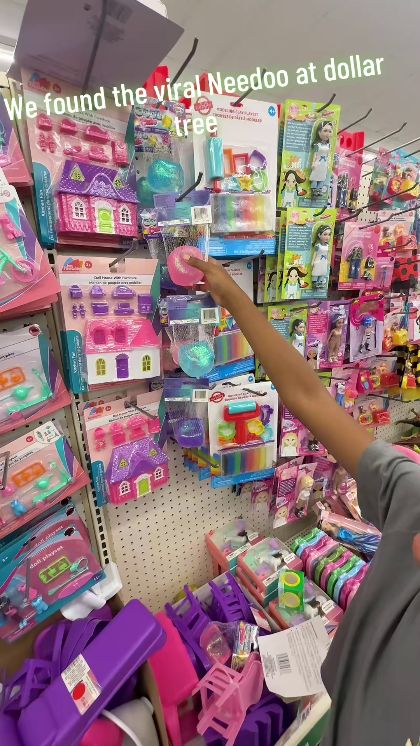 @adorekiss - 1M views - "We found the viral Needoo at dollar tree" - ▶ watch
Why it works: handheld, in-the-moment footage feels like a friend texting you a find. The production value is near zero. The hook borrows energy from an existing trend (the Needoo toy was already viral) instead of building from scratch.
The play: any brand or creator can do this. Find something trending in your world, get there in person, film it handheld, and name the trend in the first line of text.
Find trending hooks in your niche before they peak.
2. Talking-head into screen recording - tutorial promise
@alyvibecodes opened on her face, made a bold income claim ("$1.8k in 5 minutes"), then cut to a screen recording of the platform she was describing. The account had 310 followers. The video pulled 89K views - 287x their normal reach.
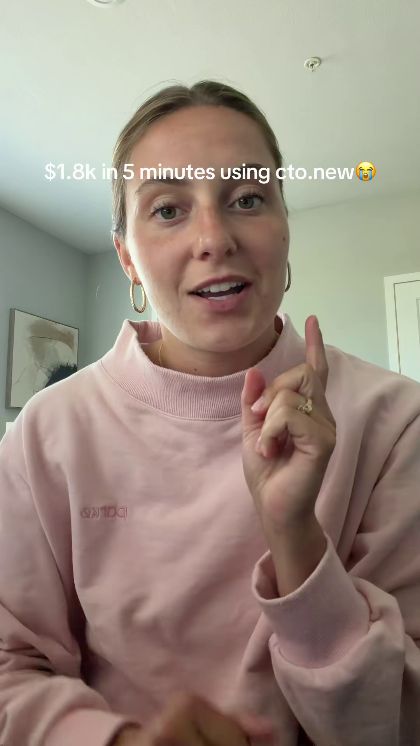 @alyvibecodes - 89K views - "$1.8k in 5 minutes using cto.new" - ▶ watch
Why it works: the face builds instant trust, the number creates urgency, and the screen recording delivers proof. Three elements, one reel.
The play: open on your face with a specific result ("I did X in Y time"), then cut to your screen, your product, or your process to show exactly how. Works for SaaS, services, education, e-commerce - any niche where a result can be named.
Set up a marketing agent to surface outlier tutorials in your industry.
3. Split-screen comparison - "ad vs. reality"
@kydyuzhi_ni used a split-screen format to compare what a pressure washer nozzle's ad claimed versus what actually happened in a real test. 7.5M views. The hook: "AI ads v.s. Reality."
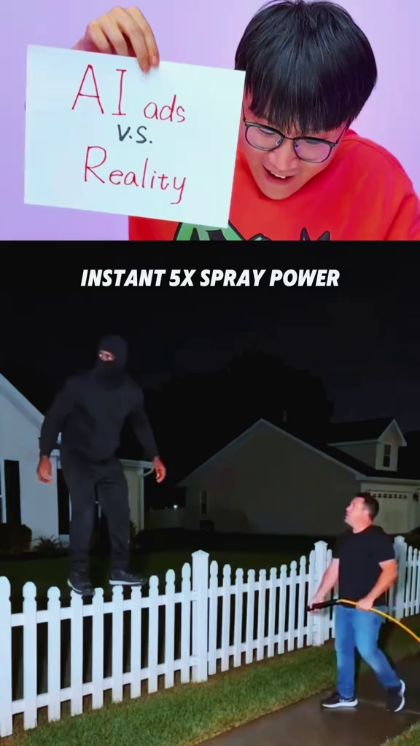 @kydyuzhi_ni - 7.5M views - "AI ads v.s. Reality" - ▶ watch
Why it works: the comparison format creates instant tension. Viewers stay to see who wins. It also taps a universal frustration - overpromised products - so it spreads beyond the creator's existing audience.
The play: pick any "expectation vs. reality" angle in your world. What do people in your industry get sold versus what they actually get? Film the two sides, stack them, and let the gap do the work.
See which comparison formats are getting outlier views in your space.
4. Voiceover tutorial - face-to-camera into a workflow demo
@indra.creates spoke directly to camera with a tutorial-promise hook ("I'm about to tell you the easiest and simplest way"), then cut to a screen recording walking through the actual process step by step. 555K views from 17K followers - 32x their normal reach.
 @indra.creates - 555K views - "If you found this video, you must be a really lucky person because I'm about to tell you the easiest and simplest way that I know that you can make money online." - ▶ watch
Why it works: the spoken hook creates a personal connection that text alone can't. Then the screen recording delivers the substance. Face + proof = trust + credibility in one clip.
The play: for any creator coach, consultant, or educator - open on your face with a promise, then show the actual workflow. The face is the hook; the demo is the payoff.
Find the hooks pulling views in your niche this week.
Best app to make a reel
App | Best for | Cost |
|---|---|---|
Reels natively, trending audio | Free | |
CapCut | Editing, auto-captions, templates | Free (paid tier) |
Canva | Photo reels, branded slides | Free (paid tier) |
For most people, CapCut is the answer to "best app to make a reel with music and photos." It handles trimming, auto-sync to beat, captions, and export in one place. Then post directly to Instagram or Facebook.
What this means for you in 2026
Your hook is your whole strategy. The first line of text or the first spoken sentence decides whether anyone watches. Write it before you film anything else.
Pick one format and repeat it. Handheld vlog, talking-head + screen recording, split-screen comparison, text-over-still - pick the one that fits your voice and do it consistently. Consistency beats novelty.
Photos and slides are a real option. If you don't want to be on camera, a text-on-image reel with the right hook and a trending sound can pull serious views. The algorithm doesn't care.
Small accounts win when the concept is right. Three of the examples above came from accounts with fewer than 500 followers. Distribution is about the idea, not the follower count.
Views are not the goal - the audience is. Every reel that teaches, entertains, or resonates with a specific person builds a group of people who know, like, and trust you. That group is what converts into customers, clients, and revenue. Polish doesn't build that. Showing up consistently in your own voice does.
Set up a marketing agent on your niche. Start a $0 Virlo trial, point a marketing agent at your niche, and wake up to the breakout videos already surfaced.
Frequently asked questions
How do you make your own reels? Open Instagram or Facebook, tap the Reel option, record or import your clips, add music, trim, caption, and post. The whole process takes under five minutes once you've done it once.
How do I make a reel with photos and music? In Instagram, tap + then Reel, import multiple photos from your gallery, pick a song first so the app can auto-sync timing, then add text overlays and post. Canva is a good alternative if you want more layout control.
What is the best app to make a reel? CapCut is the most versatile free editor - it handles trimming, beat-sync, auto-captions, and templates in one place. For posting natively with trending audio, Instagram's built-in editor is the fastest path.
How to create reels on iPhone? Open Instagram, tap + then Reel, and record directly with your iPhone camera or import from your Photos app. CapCut (free on the App Store) gives you more editing control before you upload.
How do I find out what reel formats are working in my niche? Virlo tracks breakout videos across every niche and surfaces the hooks and formats pulling outlier views. Start a free Virlo trial and point a marketing agent at your space.
Making a reel in 2026 is a five-minute task. Making one that builds a real audience takes knowing which format, hook, and concept your specific viewers respond to - and the part worth studying.
→ Start a $0 Virlo trial and see exactly which reel formats are pulling views in your niche right now.

About the author. Jaife Esienna is Co-founder of Virlo, a marketing agent that surfaces the viral videos, hooks and formats winning in any niche across TikTok, Instagram Reels and YouTube Shorts. He writes about short-form video distribution, AI marketing workflows, and the real plays behind viral content.
See What's Trending Right Now
- Social listening for TikTok, Reels & Shorts
- Spot viral trends before they peak
- Turn insights into ads, scripts & briefs
The Signal Newsletter
Weekly trend breakdowns, creator insights, and social listening tips — straight to your inbox.
Subscribe FreeSee Virlo in action
See What's Trending Right Now
- Social listening for TikTok, Reels & Shorts
- Spot viral trends before they peak
- Turn insights into ads, scripts & briefs
The Signal Newsletter
Weekly trend breakdowns, creator insights, and social listening tips — straight to your inbox.
Subscribe FreeRelated Articles
Ultimate Guide to Clip Farming in 2026 for Creators
Clip farming means three different things in 2026. Here's what each one is, how creators actually run it, what it pays, and what the platforms now penalize.
What's Trending on TikTok in September 2026
The last week of September is a handoff week. The deadpan reveal formats that dominated mid-month are still running, but the audio chart underneath them has rotated almost completely: Wxoda's "VIBIN" now holds the top slot, Adéla's "Nicole Kidman" has climbed to number two, and Malcolm Todd's "OB...
How Will AI-Generated Videos Impact YouTube Shorts Creators?
AI is making YouTube Shorts faster and cheaper to produce, but it’s also creating new challenges for creators. Here’s how AI-generated video could impact competition, monetization, disclosure, copyright, and the future of short-form content.
Put this into practice with Virlo
Turn what you just read into real research. These are the tools creators, agencies, and brands use to find what's working on short-form video.
Content Research Agent
Run your short-form research on autopilot — outliers, creators, and sounds across TikTok, Reels, and Shorts.
Tracking Center
Monitor breakout creators, videos, and competitors with daily snapshots and deep AI analysis.
Free Data
Explore free viral hooks, trending niches, breakout products, and more — no account required.
Get The Signal
Join creators, marketers, and agencies getting weekly trend breakdowns and social listening insights delivered free.
Subscribe to the Newsletter
Stop Guessing. Start Knowing.
Join thousands of digital entrepreneurs using data to take the guesswork out of capitalizing on trends.