Meta Ad Library: How to ACTUALLY Use It for Competitor Research
How to use the Meta Ad Library for competitor research: the filters that matter, how to spot winning ads, the EU data trick, and where it falls short.

Himanshu Bisht
Professional Blog Writer
Himanshu Bisht is a digital community and content expert. With the strategies he shares, companies and creators have generated over 10 million dollars in combined sales. His views have been featured in the magazines like Forbes and Authority Magazine. Himanshu writes expert articles for creators on Virlo AI.
The Meta Ad Library is a free, public database of every ad currently running across Facebook, Instagram, Messenger, and the Audience Network. Anyone can open it, search any brand, and see the exact creative that brand is paying to distribute right now. No login, no ad account, no permission from the competitor.
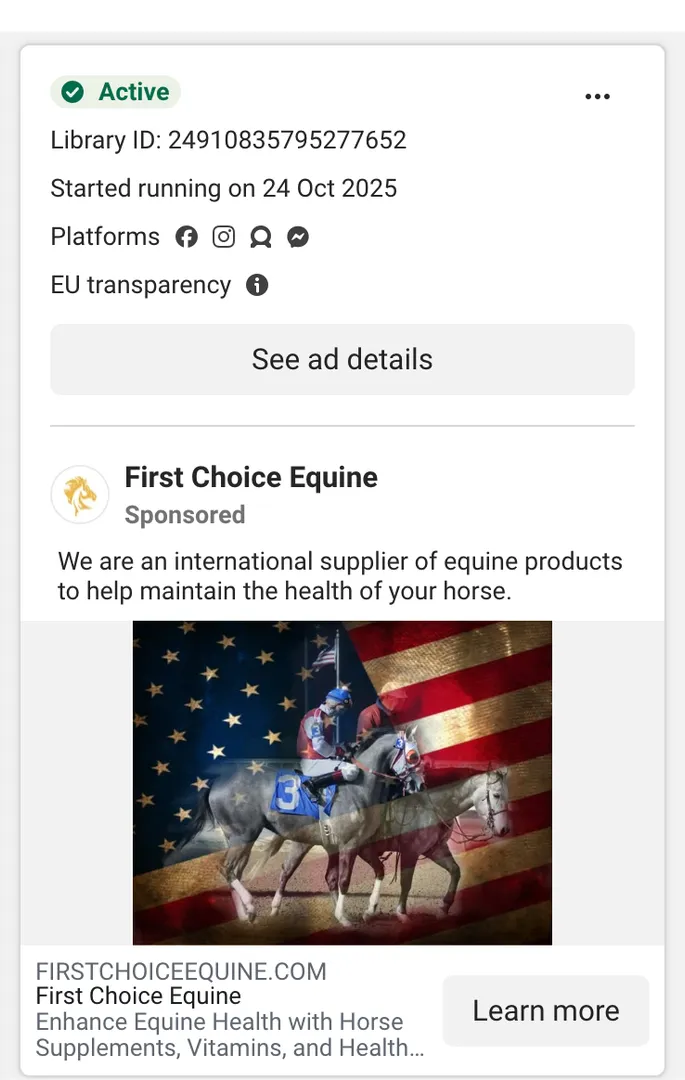
Here is an example of Meta ad information inside the Library. You can research and see from tens of categories and thousands of active ads running on all Meta platforms.
Earlier it was just the part of Facebook and was popular as Facebook Ad Library. After Meta merged all its platforms like Instagram, WhatsApp, Threads and Facebook in 2021, it has become one of the most powerful tools for research and analysis.The tools in meta library gives you a wall of ads and almost no guidance about which ones matter.
We have worked with hundreds of creators over the last few months that are using Meta for growing their business. Specifically using Meta ad library, they are identifying hidden trends, working ads and so much more. This guide give you precisely how to read the library like a media buyer. You see, when you learn what the filters actually reveal, the signals that separate a winning ad from an expensive experiment, how it compares to paid ad spy tools, and where it stops being useful so you know what to do next Ad library becomes a goldmine.
TL;DR: Open the Meta Ad Library at facebook.com/ads/library, set your country, choose All ads, and search a brand name. The highest-value signal is longevity: ads running the longest are the ones profitable enough to keep funding. Use the number of active variations to spot scaling campaigns, check EU results for targeting and reach data unavailable elsewhere, and remember that paused ads vanish entirely, so track competitors continuously rather than checking occasionally.
What the Meta Ad Library ACTUALLY shows you
Meta launched the archive in May 2018 for political ad transparency, then expanded it to cover all advertising. That origin explains both its strengths and its frustrations. It was built as a compliance and accountability tool, so you are using it for a job it was never optimized to do, which is why the interface withholds exactly the sorting a marketer wants most.
Every currently active ad, the creative itself as the audience sees it, the platforms each ad runs on, the date it started running, and the number of variations in a campaign. For ads served in the European Union, you get considerably more, which I will come back to because most people never look there.
Though, you do not get the performance data. So No spend, no click-through rate, no conversion numbers, and no engagement metrics you can filter by. The library reveals what competitors are running while staying silent on results.
How to search the Meta Ad Library properly
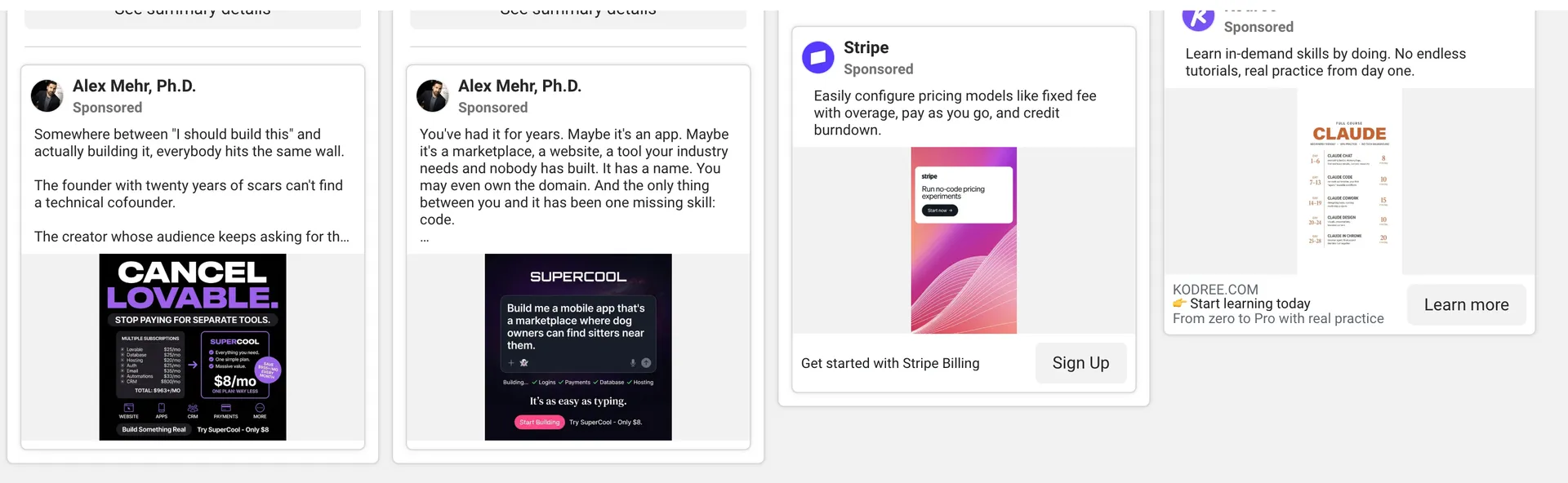
Start at facebook.com/ads/library. Set your country first, because results change dramatically by market and the default may not be where your competitor actually sells. Choose All ads rather than the political category, then search either a brand name or a keyword.
Brand search shows you one competitor's full active roster, and it is where you start when you already know who you are chasing. Keyword search does something different: it surfaces everyone bidding on a theme, which is how you find competitors you did not know you had.
If you search "cold plunge" or "project management software" and the whole category advertising into your space appears, including small brands running far more creative than their size would suggest.
I recommend using brand search when you want depth on a known player, and keyword search when you want to map a category or find the newcomers. Running both on the same afternoon gives you the competitive set and the emerging threats in one sitting.
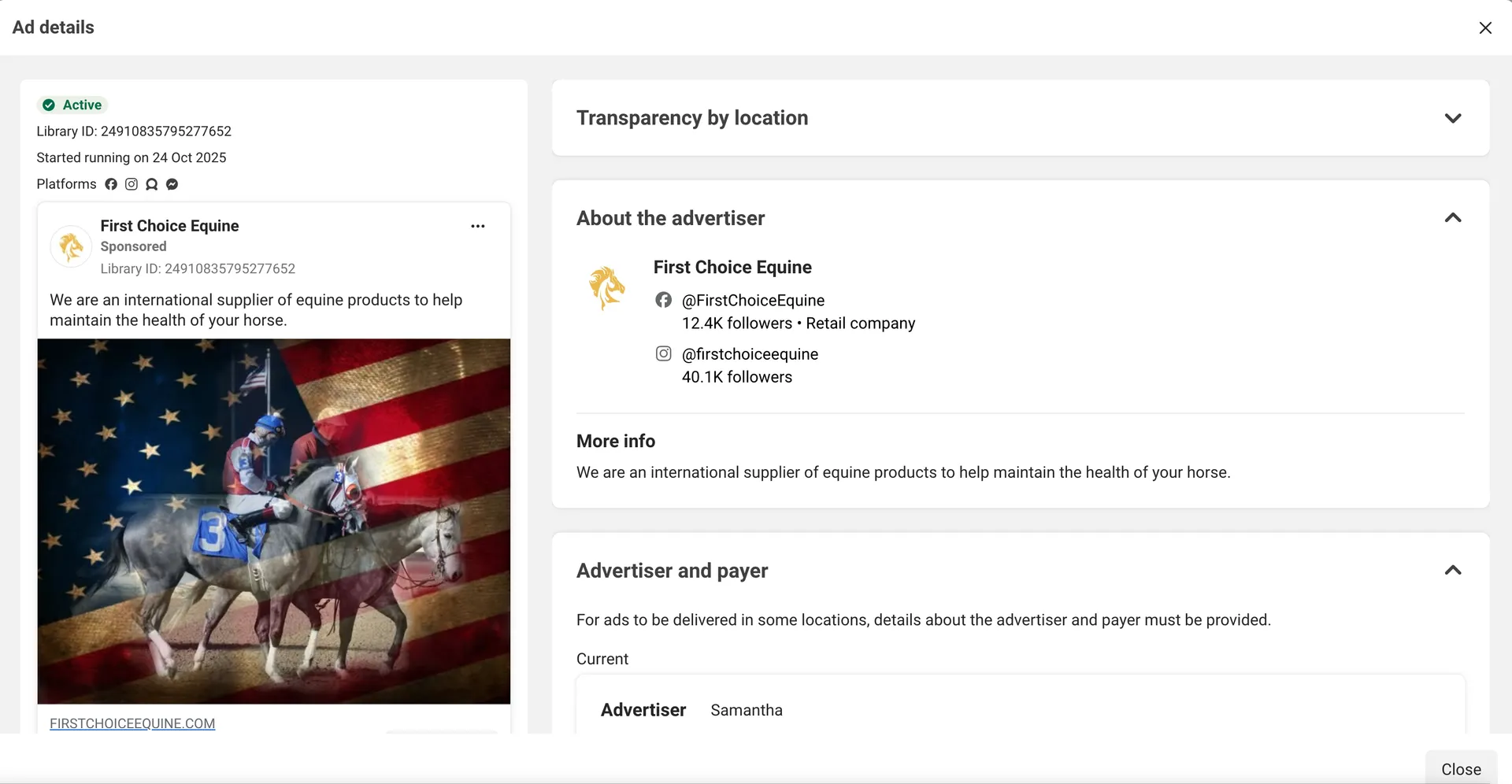
Two mechanics people miss. First, open See ad details on any ad, because that panel shows how many ads are running the same creative and text, which is the variation count that tells you whether a concept is being scaled. Second, your browsing is anonymous. Meta does not notify a page that you viewed its ads, and there is no way for a competitor to see who has been researching them, so you can look as often as you like.
Country selection deserves more care than it usually gets. Changing the country does not simply translate results, it changes which ad sets you are seeing entirely, because brands run different creative and different offers by market. If your competitor sells in five countries, you are looking at five different research targets, and the creative that survives in one market often reveals what they will roll out in another.
Here are some of the filters to use:
Media type separates video from static, which tells you where a brand is investing production budget. A competitor moving from images to video across a quarter is telling you something about what worked.
Platform shows whether an ad runs on Facebook, Instagram, Messenger, or Audience Network. Instagram-only placements usually signal a younger or more visual target, and Facebook-heavy placement often means an older demographic or a lead-generation objective.
Date range is where the real research happens, covered in the next section.
Impressions filtering exists with buckets running from under 1,000 up to 1M and above, though it is most reliable on political and social issue ads, where Meta discloses considerably more. Where you do see it, ads carrying a Low Impression Count badge are usually tests rather than committed spend, and skipping them saves you from studying creative nobody chose to scale.
If you run this research regularly, save your search. Meta lets you store search parameters and rerun a complex query in one click, which turns a twenty-minute exercise into a weekly two-minute habit.
Identifying the Meta Signals
One of the most challenging part of using Meta library (and other general copywriting swipable assets) is that it is easy to get distracted. Over the time I have discovered that there are certain Signals that can save you many hours of hardwork and frustration. Here are some:
Longevity is the signal that holds up best.
Paid advertising is ruthless, and no competent team keeps funding an ad that loses money. So an ad running for four months is, with high confidence, profitable.
Sort your attention toward the oldest start dates rather than the newest, because the recent ads are experiments while the old ones have already survived a verdict. This reframe changes how most people use the library, since the instinct is to look at whatever launched yesterday.
Variation count reveals scaling.
A concept running as eight or twelve near-identical versions (different hooks, different thumbnails, different opening lines) means the brand found something that works and is now testing hard to extend it. A single version is an experiment, and a dozen versions is a commitment, so weight your study accordingly.
Repetition across time reveals the core offer.
Compare what a brand has run continuously for a year against what appears seasonally. The permanent ads carry the message they have settled on for cold audiences, which is their positioning after repeated rounds of market feedback rather than after a branding workshop.
Creative patterns reveal the hook that converts.
Once you have identified the long-running ads, study their first three seconds specifically.
Note the opening line, whether it leads with a problem or a result, whether a face appears immediately, and whether the format looks professionally produced or filmed by a customer. In our analysis of short-form video at Virlo, the creative that sustains attention is consistently the material that looks native to the feed rather than produced for it, and the same pattern shows up in the ads that survive longest in the library.
Landing pages reveal the funnel.
Every time you find a well performing ad, look for the landing page associated with it and see what is in there. Ads that are running for long term give you an idea that they are generating higher CTR and conversions in general.
Click through. The page a proven ad points to shows you the offer, the price framing, and the conversion path that competitor has settled on, which is the other half of the intelligence and the half most researchers skip.
The EU trick most researchers miss
This part of the library gets ignored routinely, and it holds detail you cannot get anywhere else in the tool.
Because of the Digital Services Act, ads delivered in the European Union carry disclosures that do not exist in other markets. For EU-served ads you can see targeting parameters including age ranges, gender, and location, the approximate reach per country, and information about who paid for and benefits from the ad. You also get up to a year of retention on inactive ads instead of losing them the moment they stop running.
The practical move can be that even if your market is the United States, switch your country filter to Germany, France, Ireland, or another EU market and search the same competitor. Most international brands run overlapping creative across regions, so their EU disclosures let you read the targeting strategy behind campaigns you compete with at home. For anyone doing competitor ad research seriously, this is as close as the public tools get to seeing another brand's audience settings.
Where the Meta Ad Library falls short
There are a few things to discuss in this segment for a business owner or a creator. Especially because you might feel like everything you see is true inside. There is one catch to it:
Paused ads disappear completely.
Non-political ads vanish from the library the moment they stop running. If a competitor ended a campaign last month, it is gone, along with any chance of studying it. This means the library shows you a snapshot of the present with no memory, and anyone checking in occasionally is seeing an incomplete picture by design.
There is no performance data. You infer from longevity and variation count because nothing else is offered. Those inferences are reliable rather than certain, since a well-funded brand can keep a mediocre ad running longer than its results deserve.
Search is flat.
You can filter by country, media type, platform, and impressions, but not by engagement, creative longevity, or whether something is currently scaling. The sorting you actually want, which is show me what is working, is the one thing the interface will not do.
Organic context is missing entirely.
The library shows paid creative in isolation, which means you see the ad but not the organic content it was probably built from, not the creator formats trending in the niche, and not whether the concept originated on TikTok two months earlier. In most consumer categories now, the paid creative is downstream of an organic trend, so studying ads without that context means arriving late to the idea.
The Meta Ad Library API and the Ad Library Report
Before paying for anything, know that Meta ships two free extensions of the library. There is a high chance that you might save a lot of money on third-party platforms by using Meta's default Ad library APIs.
The Library API lets you query the archive programmatically rather than clicking through the interface. This can be gamechanger if you are tracking dozens of brands or building the data into a dashboard. Access requires you to confirm your identity and location with Meta, a process that involves submitting ID and typically takes a day or two, and you need a Facebook developer account with an access token.
Unfortunately, the API returns rich fields for political and social issue ads, including spend ranges, impressions, and demographic distribution, while commercial ads come back with a much thinner set: the creative, the page, the dates, and basic metadata. If you came for competitor spend on a DTC brand, the API will not give you what the political dataset shows. Query volume is also rate limited, so bulk scraping of an entire category is not the intended use and will get throttled.
Agencies monitoring a large competitive set can utilize Library APIs easily. Also if you want a scheduled record of competitor creative so the disappearing-ads problem stops erasing history, this is the right tool for you. Personally for me as an entrepreneur who uses it for market research and finding out winning funnels, I find web interface much more easier to use. Probably, everyone else will get more from the web interface in less time.
The Ad Library Report is another separate product and worth ten minutes of your attention. It publishes aggregate spending data on political and issue advertising by advertiser and region, downloadable as a file. For commercial competitor research it is close to useless, since your competitors are not in it, but for anyone working in advocacy, public affairs, or any regulated category, it is the only place this spending data exists in public.
Meta built these for transparency obligations, not for marketers, so the depth follows the regulation rather than your use case.
Meta Ad Library vs paid ad spy tools
Once those limits start costing you time, the question becomes whether to pay for something, so here is the honest comparison.
Meta offers an Ad Library API, which requires identity verification and returns full data mainly for political and social issue ads, with a thinner set of fields for commercial advertising. There is also the Ad Library Report, which publishes aggregate spending data, again focused on the political category. Both are worth knowing about, and neither solves the commercial researcher's problem, because the fields you want are the ones Meta chose not to expose.
Paid ad spy tools exist to fix exactly the four gaps above. Foreplay is popular with creative strategists for saving, tagging, and organizing swipe files at scale. AdSpy offers a large searchable archive with engagement-based sorting. Atria and similar platforms add persistent history so paused ads remain studyable, along with spend estimates and filters the native library refuses to provide. What you pay for, in every case, is memory and sorting rather than access, since the underlying ads were always public.
Where a short-form intelligence tool fits is the fifth gap none of those close: the organic origin of the creative. Most winning ad concepts in consumer categories started as an organic format that worked on TikTok or Reels weeks earlier, so seeing the paid creative alone means meeting the idea late. Virlo's Meta Ads Library feature keeps a running history of competitor ads so the paused ones stay in your archive, and because it also tracks what is breaking out organically across TikTok, Reels, and Shorts, you can see the format before it becomes everyone's paid creative. If your competitors are running ads that all look like a specific TikTok trend, you want to know that when the trend appears, not when their campaign launches.
The practical recommendation: start free, use the library properly with the method above, and pay for a tool only when the disappearing-ads problem or the swipe-file management is genuinely slowing you down. Plenty of good creative strategy has come from nothing but the free library and disciplined screenshots.
Building a research system rather than a browsing habit
Turning occasional library visits into a routine is what separates useful competitor ad research from browsing, because the disappearing-ads problem means research quality depends heavily on frequency.
Build a competitor list of five to ten brands, including the two obvious leaders and a few smaller aggressive spenders, since the small brands tend to test faster and reveal the emerging playbook first. Check them on a fixed cadence, weekly if your category moves quickly, monthly otherwise.
Screenshot everything worth remembering, because you cannot rely on the library to keep it for you. A simple folder or Notion board with the creative, the start date, and the variation count gives you the historical archive Meta refuses to provide, and after a quarter you will be able to see patterns nobody else in your category can see.
Then log what changes rather than what exists. New concept appearing, variation count rising, an old reliable ad finally disappearing, each of these is a decision your competitor made, and reading the sequence of decisions is more valuable than any single snapshot.
If you also run paid social on TikTok, apply the same discipline there with a TikTok ad spy approach, since the platforms increasingly share creative formats and the brand winning on one is usually testing the same concept on the other within weeks.
Turning research into your own campaigns
Research only pays once it changes what you produce, so here is how the findings become work.
Build a swipe file organized by function rather than by brand. Hooks in one place, offer framings in another, formats in a third. When you sit down to write a new ad, you choose from proven patterns instead of facing an empty page, and those patterns came from creative that survived real budget scrutiny.
Adapt structures while leaving the creative alone. What makes a competitor's ad work is usually structural: the problem it names in the first line, the sequence of proof, the specificity of the offer. Lifting their actual footage carries legal risk and rarely transfers anyway, since their creative was tuned to their brand and their audience.
Look for the gap as much as the pattern. When every brand in a category runs the same testimonial format, the opening is often the format nobody has tried, and the library is useful here precisely because it shows you the consensus you can choose to break.
Here is what this looks like concretely. Say you sell a supplement and you have five competitors on your list. For every ad still running after sixty days, you log four fields: the hook line, the format (talking head, demonstration, text-on-screen), the offer framing (discount, bundle, subscription, free trial), and the variation count. After a month of Fridays you will have a spreadsheet of forty or fifty proven ads, and the patterns become obvious enough to act on. My own threshold for greenlighting a test is a concept that has run past sixty days with five or more live variations across at least two competitors, because at that point the category has validated the idea and I am adapting a structure rather than gambling on one.
Then test in small batches against your own baseline. Competitor research narrows what to try without telling you what works for your audience, and treating another brand's proven ad as a guarantee is where this research usually goes wrong.
Frequently asked questions
What is the Meta Ad Library?
The Meta Ad Library is a free public database of all ads currently running on Facebook, Instagram, Messenger, and the Audience Network. Anyone can search it without an account to see competitor creative, the platforms each ad runs on, and how long it has been active.
Is the Meta Ad Library free to use?
Yes, completely free with no account required. Visit facebook.com/ads/library, set a country, choose All ads, and search any brand or keyword. Meta built it for advertising transparency, and it remains open to everyone.
How do I see a competitor's Facebook ads?
Search the brand name in the Meta Ad Library with your target country selected. You will see every ad they are running now, including creative, placements, and start dates. Sort your attention to the oldest ads, since long-running creative is usually profitable creative.
Can you see how much competitors spend on Meta ads?
No, spend data is only available for political and social issue ads. For commercial advertising you can see impressions ranges in some cases, but you must infer budget from indirect signals like how long an ad has run and how many variations of it are active.
Why do some ads disappear from the Meta Ad Library?
Non-political ads are removed as soon as they stop running, so paused campaigns vanish with no archive. This is why continuous tracking beats occasional checking, and why screenshotting or using a tool that keeps history matters for serious research.
What does the EU version of the Meta Ad Library show?
Ads served in the European Union include targeting parameters such as age, gender, and location, approximate reach by country, payer and beneficiary details, and up to a year of retention on inactive ads. Searching an EU country often reveals strategy details unavailable in other markets.
How do I know which competitor ads are actually working?
Look at longevity first, since ads running for months are almost certainly profitable, then at variation count, because a concept running as many near-identical versions signals a brand scaling a winner. Those two signals together give you a dependable read without any performance data.
Is the Facebook Ad Library the same as the Meta Ad Library?
Yes, they are the same tool. It was called the Facebook Ad Library before the company rebranded to Meta in 2021, and both names still circulate. The URL remains facebook.com/ads/library.
Can competitors see that I viewed their ads?
No. Browsing the Meta Ad Library is completely anonymous, and Meta does not notify pages when someone views their ads or tell them who has been looking. You can research any brand as often as you want.
How far back does the Meta Ad Library go?
For commercial ads, only as far back as what is currently running, since non-political ads are removed when they stop. Political and social issue ads are archived for seven years, and ads served in the EU stay available for a year after their last impression.
Is there a Meta Ad Library API?
Yes. Meta offers an Ad Library API that requires identity verification, though it returns full data mainly for political and social issue ads and a limited set of fields for commercial advertising. Most commercial researchers find the web interface or a third-party tool more practical.
What are the best ad spy tools for Facebook and Instagram?
The Meta Ad Library itself is free and covers the basics. Paid ad spy tools like Foreplay, AdSpy, and Atria add persistent archives, engagement sorting, and swipe-file management, and short-form intelligence tools add the organic trend context behind the creative.
Starting with Meta Ad Library
The Meta Ad Library rewards method over browsing. Pick one competitor, search them with your country set correctly, and sort your attention to the ads that have been running longest rather than the ones that launched yesterday. Study the first three seconds of those survivors, count the variations, click through to the landing page, and screenshot what you want to remember.
Do that for five brands on a repeating schedule and within a quarter you will hold a view of your category that no single visit could give you. The Meta Ad Library is free and open to everyone, so the advantage never came from access. It comes from reading carefully what is already sitting in public, and from keeping a record of it while your competitors forget.
See What's Trending Right Now
- Social listening for TikTok, Reels & Shorts
- Spot viral trends before they peak
- Turn insights into ads, scripts & briefs
The Signal Newsletter
Weekly trend breakdowns, creator insights, and social listening tips — straight to your inbox.
Subscribe FreeSee Virlo in action
See What's Trending Right Now
- Social listening for TikTok, Reels & Shorts
- Spot viral trends before they peak
- Turn insights into ads, scripts & briefs
The Signal Newsletter
Weekly trend breakdowns, creator insights, and social listening tips — straight to your inbox.
Subscribe FreeRelated Articles
How to Use TikTok to Grow Your Business
Learn how to use TikTok to grow your business with educational content, product demonstrations, customer stories, TikTok SEO, creator partnerships, paid ads, and short-form content intelligence.
How Will AI-Generated Videos Impact YouTube Shorts Creators?
AI is making YouTube Shorts faster and cheaper to produce, but it’s also creating new challenges for creators. Here’s how AI-generated video could impact competition, monetization, disclosure, copyright, and the future of short-form content.

9 Best TikTok and Instagram Reels Analytics Tools for Performance Tracking in 2026
TikTok and Instagram Reels analytics tools help you understand what happened after a video was published. They bring together views, watch time, reach, engagement, follower movement, and post-level comparisons so your next creative decision is based on evidence instead of memory. The best fit dep...
Put this into practice with Virlo
Turn what you just read into real research. These are the tools creators, agencies, and brands use to find what's working on short-form video.
Content Research Agent
Run your short-form research on autopilot — outliers, creators, and sounds across TikTok, Reels, and Shorts.
Tracking Center
Monitor breakout creators, videos, and competitors with daily snapshots and deep AI analysis.
Free Data
Explore free viral hooks, trending niches, breakout products, and more — no account required.
Get The Signal
Join creators, marketers, and agencies getting weekly trend breakdowns and social listening insights delivered free.
Subscribe to the Newsletter
Stop Guessing. Start Knowing.
Join thousands of digital entrepreneurs using data to take the guesswork out of capitalizing on trends.