How to Connect Virlo to Claude Desktop, Cowork, and OpenClaw via MCP
A step-by-step setup guide from Virlo cofounder Nic Mauro on connecting Virlo's native MCP server to Claude Desktop, Claude Cowork, and OpenClaw for AI-powered short-form video intelligence across TikTok, YouTube Shorts, and Instagram Reels.


I've been running this workflow myself for a few months. Before any new prospect conversation or content brief, I'll ask Cowork to run a full niche analysis on a category, drop the output into a file, and I have a market intelligence report in my folder before I finish my coffee.
Now that our native MCP server is live, I wanted to write up the exact setup — no fluff, just the steps.

What Virlo Does
Virlo is a short-form video intelligence platform covering TikTok, YouTube Shorts, and Instagram Reels. The core use case: brand and agency teams who need to know what's working in a content category before they brief creative — without spending hours manually scrolling.
Four main layers:
Orbit — Keyword-based social listening across all three platforms
Comet — Automated niche monitoring on daily, weekly, or monthly schedules
Satellite — Creator and video intelligence, outlier detection, deep-dive profiles
Tracking — Long-term monitoring with recurring metric snapshots and AI analysis reports
The MCP server exposes all of this — 20 tools total — plus three pre-built workflow prompts that handle multi-step research pipelines automatically.
Prerequisites
Before starting, you need two things:
A Virlo API key. Get yours at dev.virlo.ai/dashboard/api-keys. Keys start with virlo_tkn_. Any paid plan includes API access — all plans get every endpoint.
The AI client you want to connect. Claude Desktop (Cowork is a tab inside it, requires Pro or Max), or OpenClaw installed locally.
Connect to Claude Desktop
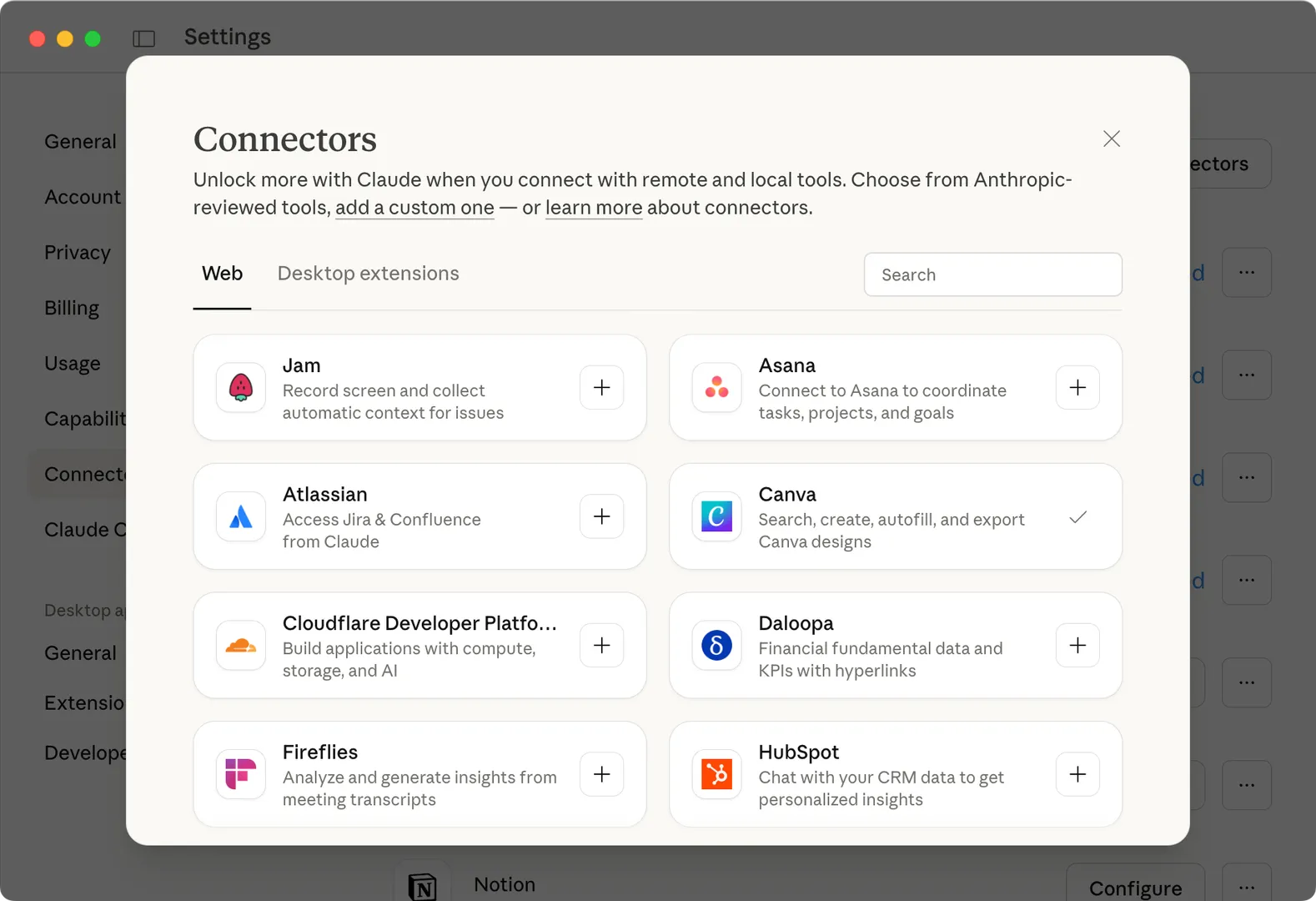
Claude Desktop manages remote MCP servers through its Connectors panel. Virlo is a remote HTTP server — no local process to run, no config file to edit manually.
Open Claude Desktop. Go to Settings → Connectors → Add Custom Connector.
Paste the MCP server URL: https://dev.virlo.ai/api/mcp/mcp
Go to dev.virlo.ai/docs/mcp, paste your virlo_tkn_ key into the quick-setup widget, and select the Claude Desktop tab. It generates a ready-to-use config with the Bearer token header formatted correctly — copy that.
Click Add. Virlo tools appear in your connector panel immediately.
Note: Claude Desktop does not connect to remote MCP servers configured via claude_desktop_config.json — you must use Settings → Connectors. That file path is for local stdio servers only.
If you prefer to configure manually, the JSON structure is:
{ "mcpServers": { "virlo": { "url": "https://dev.virlo.ai/api/mcp/mcp", "headers": { "Authorization": "Bearer virlo_tkn_YOUR_KEY" } } } }
Connect to Claude Cowork
Cowork is a tab inside Claude Desktop and shares the same connector infrastructure. If you followed the steps above, Virlo is already available in Cowork. Nothing extra required.
Where Cowork specifically shines: you can give it a multi-step task — "run a full niche analysis on home gym content, write the report to a markdown file, and save it to my desktop" — and it executes the full workflow autonomously. It queues the Orbit search, polls for completion, pulls the AI analysis report, formats it, and drops the file in your folder. That's what I use before sales calls and content briefs.
Pro tip: Use the full_niche_analysis workflow prompt in Cowork for maximum output per instruction. It chains keyword search → creator outlier detection → Satellite deep-dive → Comet monitor setup automatically.
Connect via OpenClaw
For OpenClaw users, we built a dedicated ClawHub skill — the Short-Form Market Research Brain — that teaches your agent the full Virlo workflow. It handles keyword research, AI analysis reports, async job polling, creator outlier detection, recurring monitor setup, and credit management. You just ask it to research a niche.
Install the skill:
clawhub install short-form-market-research-brain
Configure your API key:
openclaw config set short-form-market-research-brain.api_key "virlo_tkn_YOUR_KEY"
That's the full setup. Prompts that work well after install:
"Research the TikTok Shop skincare niche and give me a trend report"
"Find creators making content about personal injury law"
"What's trending on social media today?"
"Analyze @username on TikTok — how are they performing relative to their baseline?"
"Set up weekly monitoring for home gym content"
"Start tracking @khaby.lame on TikTok with a 12-hour scrape cadence"
All 20 Tools Across the API
Once connected, your AI client has access to all of this:
Analytics (instant results)
search_hashtags — Trending hashtags across platforms or filtered by YouTube/TikTok/Instagram — 10 credits get_hashtag_performance — Detailed metrics (views, likes, comments) for a specific hashtag — 10 credits get_trending_videos — Top viral videos from the last 48 hours — 50 credits get_trends — Current trend groups with optional date range — 50 credits get_trends_digest — Today's curated trend digest — 50 credits
Orbit — Keyword Search (async)
search_keywords — Keyword search across social platforms, auto-waits up to 55s for results — 100 credits list_keyword_searches — List your previous keyword searches — Free get_keyword_search_results — Pull videos, ads, or creator outliers from a completed search — Free
Comet — Niche Monitoring
create_niche_monitor — Automated monitor on a recurring schedule — 100 credits list_niche_monitors — List active monitors — Free get_niche_monitor_data — Pull results from a monitor — Free manage_niche_monitor — Update settings or deactivate — Free
Satellite — Creator & Video Intelligence (async)
lookup_creator — Full creator profile and analytics, auto-waits up to 55s — 100 credits analyze_video — Outlier analysis against a creator's typical metrics — 100 credits
Tracking & Utility
track_creator — Recurring metrics + AI report on a configurable cadence — 50 credits/cycle track_video — Same for a specific video — 50 credits/cycle list_tracked_items — All tracked creators and videos — Free get_tracking_report — Latest AI report and metric snapshots — Free check_job_status — Poll status of any async job — Free get_credit_balance — Check remaining balance — 10 credits
Built-in Workflow Prompts
Beyond individual tools, the MCP exposes three pre-built workflow prompts. Trigger one with a single instruction and the agent handles all the sequencing.
full_niche_analysis End-to-end niche research: keyword search → top video review → creator outlier identification → Satellite deep-dives → Comet monitor setup → summary with actionable insights. This is the one I use before any content strategy conversation. Example: "Use the full_niche_analysis prompt for viral cooking content on TikTok"
creator_deep_dive In-depth analysis of a specific creator: Satellite profile lookup → content pattern analysis → optional long-term tracking setup. Example: "Run creator_deep_dive for @khaby.lame on TikTok"
trend_scout What's trending right now: today's trend digest → top viral videos → rising hashtag analysis → actionable trend report across all platforms. Example: "Use trend_scout to see what's trending across all platforms today"
Credit Costs Reference
Credits never expire. You only spend on new data fetches — all list, get, and poll operations are always free. Check the X-Credits-Remaining response header after each request.
Free — All list/get/poll operations, tracking reports, keyword search results, niche monitor data, job status checks 10 credits — search_hashtags, get_hashtag_performance, get_credit_balance 50 credits — get_trending_videos, get_trends, get_trends_digest, track_creator per cycle, track_video per cycle 100 credits — search_keywords, create_niche_monitor, lookup_creator, analyze_video
Credit packs: Starter ($19.99 / 5K), Growth ($49.99 / 15K), Pro ($99.99 / 40K). Enterprise pricing at dev.virlo.ai/pricing.
Tips for Getting the Best Results
Be specific with keywords. "jeep wrangler mods" returns dramatically better results than "jeep." Multi-word phrases are the single biggest lever on Orbit result quality.
Request the full workflow, not just a search. Ask your agent to "run a full niche analysis" rather than "search for X." The full workflow pulls AI reports, video discovery, ad intelligence, and creator outlier detection — not just a video list.
Include all platforms by default. Unless you specifically need one platform, include YouTube, TikTok, and Instagram. Cross-platform patterns are usually where the most interesting signal is.
Always enable AI analysis on Orbit searches. The run_analysis flag triggers the AI-generated intelligence report — the highest-value output. For Tracking endpoints, analysis runs automatically on every cycle.
Understand async ops. Orbit searches, Satellite lookups, and video analysis are async. Tools auto-poll for up to 55 seconds — most operations complete in a single call. If a job is still running at 55s, you'll get back a job_id to poll with check_job_status. Your agent handles this automatically.
Full docs at dev.virlo.ai/docs/mcp and dev.virlo.ai/docs/ai-agents. For any agent with web access, LLM-optimized flat docs are at dev.virlo.ai/llms-full.txt — plain markdown, full API reference, no navigation to parse.
Questions on the API, MCP setup, or the async architecture, email me at [email protected]
See What's Trending Right Now
- Social listening for TikTok, Reels & Shorts
- Spot viral trends before they peak
- Turn insights into ads, scripts & briefs
The Signal Newsletter
Weekly trend breakdowns, creator insights, and social listening tips — straight to your inbox.
Subscribe FreeSee Virlo in action
See What's Trending Right Now
- Social listening for TikTok, Reels & Shorts
- Spot viral trends before they peak
- Turn insights into ads, scripts & briefs
The Signal Newsletter
Weekly trend breakdowns, creator insights, and social listening tips — straight to your inbox.
Subscribe FreeRelated Articles

the signal - issue #003
The world's first billion-dollar solo company just got built on a simple AI stack — and the only missing input is intelligence. Inside Issue #003: Virlo's new free trial, how Matthew Gallagher hit $401M solo, a 50K-view launch, Nick Saraev's callout, and this week's top TikTok outliers across 7 industries.

Virlo Year in Review
A 3/4 year summary of Virlo from launch to now. Detailing stats about the platform, company objectives for the coming year, and what worked this past year.
Put this into practice with Virlo
Turn what you just read into real research. These are the tools creators, agencies, and brands use to find what's working on short-form video.
Content Research Agent
Run your short-form research on autopilot — outliers, creators, and sounds across TikTok, Reels, and Shorts.
Tracking Center
Monitor breakout creators, videos, and competitors with daily snapshots and deep AI analysis.
Free Data
Explore free viral hooks, trending niches, breakout products, and more — no account required.
Get The Signal
Join creators, marketers, and agencies getting weekly trend breakdowns and social listening insights delivered free.
Subscribe to the Newsletter
Stop Guessing. Start Knowing.
Join thousands of digital entrepreneurs using data to take the guesswork out of capitalizing on trends.