Advertise on Instagram: The Ultimate Guide for 2026 Business Owners
Instagram has over a billion users. Advertising on Instagram correctly can create a powerful ad flywheel for your business. Here is everything you need to know about winning with Instagram Ads

Himanshu Bisht
Professional Blog Writer
Himanshu Bisht is a digital community and content expert. With the strategies he shares, companies and creators have generated over 10 million dollars in combined sales. His views have been featured in the magazines like Forbes and Authority Magazine. Himanshu writes expert articles for creators on Virlo AI.
There are two ways to advertise on Instagram, and the choice between them decides how much your first campaign teaches you.
The first is boosting a post. You tap a button under something you already published, choose a budget, and Instagram shows it to more people.
The second is running campaigns through Meta Ads Manager. More setup, more control, and access to every targeting and optimization tool Meta offers.
Boosting works for reach and awareness. For anything measured in sales, leads, or signups, it underperforms, because it optimizes for engagement rather than the outcome you want.
But there is a better way...
After running Instagram ads for years, I realized that most people actually spend more money than they earn with Instagram Ads. So in this guide, you are going to learn the Ads Manager path. Setup, campaign structure, what Instagram advertising costs in 2026, and the creative decisions that determine whether any of it works. This is regularly updated ultimate guide for creators and business owners who want to grow their business with Instagram.
TL;DR: To advertise on Instagram, set up a professional account and Meta pixel, then build campaigns in Ads Manager across three layers: campaign objective, ad set targeting and budget, and the ad itself. Choose a sales or leads objective for conversions. Start with Advantage+ audiences rather than narrow targeting. Budget 5 to 10 dollars per day per ad set. Expect CPCs between 0.40 and 2.00, and expect creative to decide most of your result.
6 Things Before You Run First Instagram Ad
Most first campaigns fail for reasons that have nothing to do with the campaign itself. The targeting and creatives can be fine, but the account might simply not built to measure what happened. So here are a few things to pay attention:
A professional account.
Instagram requires a Business or Creator account to run ads, and switching takes about a minute in your settings. Business is the right choice for companies and stores, since it unlocks contact buttons and the full analytics view. Creator suits individuals and personal brands, with slightly different messaging tools. Either works for advertising, so pick the one matching how you actually operate rather than agonizing over it.
A Business Manager and an ad account.
These are separate things, and confusing them causes real problems later. Business Manager, created at business.facebook.com, is the container that holds everything you own: your Instagram account, your Facebook Page, your pixel, your product catalog, and the people you give access to. The ad account lives inside it and is the entity that actually spends money and receives invoices.
Build this properly even if you are a single person running one brand. Assets created inside a personal profile rather than a Business Manager become genuinely painful to transfer when you hire an agency, bring on a contractor, or sell the business. Add your payment method here as well, since campaigns will not publish without one attached.
Your accounts linked in Business Settings.
Connect your Instagram account under the Accounts section, then add your Facebook Page if you have one. This matters more than it appears. Meta uses signals across both platforms to find and understand your audience, so a linked Page gives the delivery system a wider view of who responds to you.
Linking also determines which identity your ads run from, and running Instagram ads without a properly connected Instagram account means your ad appears from a Page instead. Viewers who tap through land somewhere unfamiliar, which quietly costs you the profile visits and follows that good creative usually earns.
The Meta pixel, or the Conversions API.
The pixel is a snippet of code on your website that reports back what visitors do after clicking your ad. Which pages they viewed, what they added to a cart, what they eventually bought.
Without that feedback, Meta has no way to learn what a valuable customer looks like for your business, and no way to find more people resembling them.
This is the single most consequential piece of setup, because it changes what the algorithm is capable of. An account with clean conversion data optimizes toward buyers. An account without it optimizes toward clicks, which is why so many campaigns generate traffic that never purchases.
The Conversions API sends the same information from your server rather than the browser, which recovers a meaningful share of conversions lost to browser restrictions and ad blockers. Most ecommerce platforms now offer both through a single integration, so set them up together rather than treating the API as an advanced step for later.
Install all of this before your first campaign rather than after. Pixel data compounds over time, and an account that has been collecting conversion signals for a month starts from a far better position than one beginning from zero on launch day.
Domain verification and event configuration.
This is the step where most beginners stall, usually because nothing visibly breaks when they skip it. Verify your domain in Business Settings, then configure your priority conversion events through Aggregated Event Measurement, ranking them from most to least important, typically Purchase first and view events last.
The reason this exists is Apple's privacy changes, which limited how much can be tracked for users who opt out. Meta responded by restricting each domain to eight prioritized events, and by requiring domain ownership before you can configure them. Skip the setup and your conversion reporting degrades badly for iOS traffic, which in most consumer categories represents a large share of buyers. Twenty minutes here prevents months of data you cannot trust.
A product catalog, if you sell physical goods.
A catalog is a structured feed of your products, including images, prices, and availability, that Meta reads directly. It powers shopping ads with tappable product tags, and it enables dynamic ads that automatically show each viewer the specific items they browsed.
Most ecommerce platforms sync a catalog automatically through an official integration, so the work is usually connecting an app rather than building a feed by hand. If you sell physical products, this belongs in your initial setup, since dynamic retargeting is consistently among the strongest performing campaign types available and it cannot run without one.
The three-layer Instagram ad structure
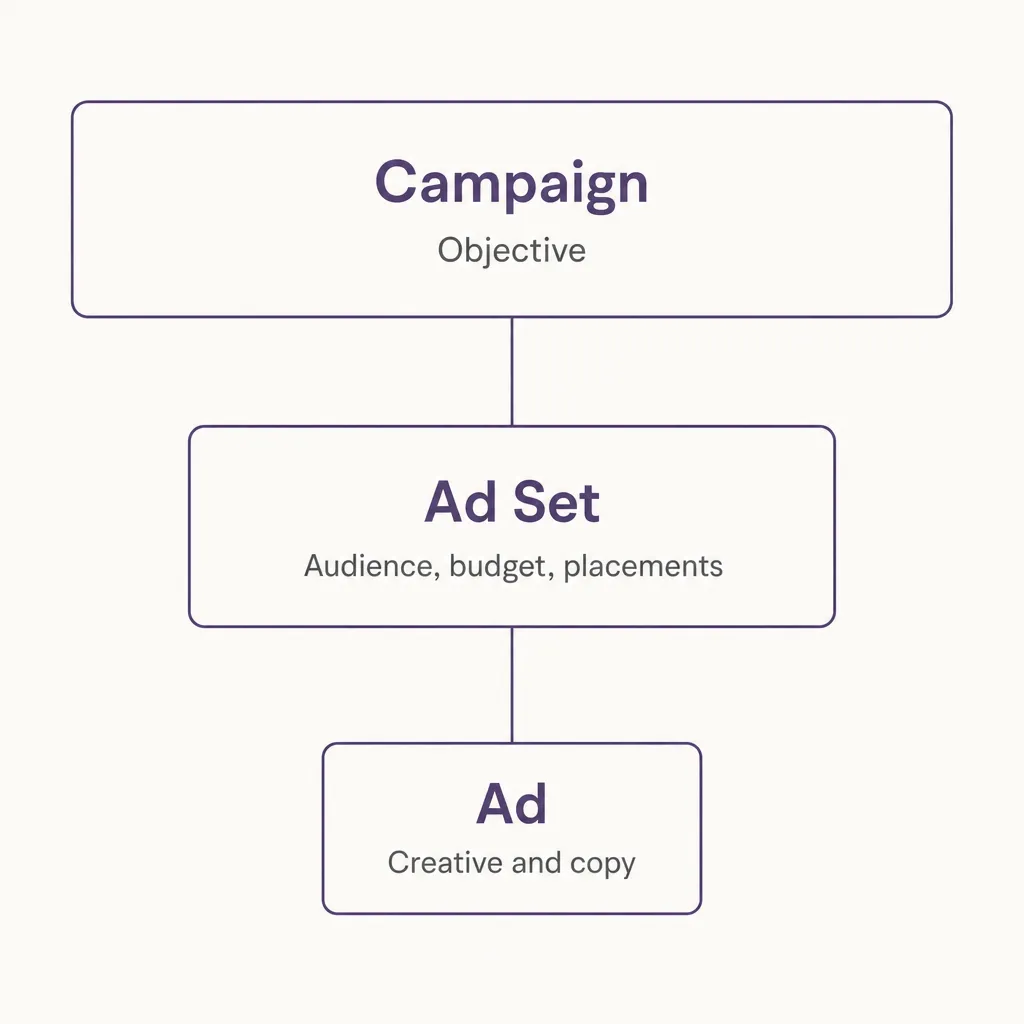
Instagram ads can be run from Meta business platform. And every Meta campaign is built across three levels, and understanding what each one controls prevents most of the confusion that comes with the interface.
The campaign layer holds your objective, and it is the most consequential decision in the entire account. This single choice tells Meta which outcome to optimize toward, and everything below it inherits that instruction. A campaign set to engagement will faithfully find people who like and comment, even if what you needed was buyers.
The ad set layer holds your audience, your budget, your schedule, and your placements. This is where the majority of your control lives, and where most of your testing should happen. Meta also treats each ad set as a separate learning unit, meaning every ad set independently gathers the conversion data it needs to optimize.
That detail has a practical consequence worth absorbing early. Splitting a small budget across six ad sets gives you six under-fed learning processes rather than one well-fed one, which is why consolidation usually outperforms fragmentation at modest spend levels.
The ad layer holds the creative itself: the image or video, the primary text, the headline, and the call to action button. Several ads can sit inside one ad set, and Meta will naturally shift delivery toward whichever performs best.
Structurally, one campaign contains multiple ad sets, and each ad set contains multiple ads. Reading the hierarchy correctly tells you where to make any given change. Testing a new audience means a new ad set. Testing a new hook means a new ad inside an existing one. Changing what you want to achieve entirely means a new campaign.
Choosing the right objective
Meta offers six objectives, and the choice carries more weight than any other setting because it determines which people the system goes looking for.
Awareness maximizes how many people see the ad and how often. It optimizes for reach and impressions rather than any action, which suits brand launches, sponsorships, and campaigns measured in recall rather than revenue. For a small business trying to generate sales, it is almost always the wrong pick.
Traffic sends people to a destination and optimizes for clicks. It works reasonably for content promotion and newsletter growth, where the click is genuinely the goal. It struggles for commerce, because Meta will happily find people who habitually click and rarely buy, and your reporting will look healthy while your revenue does not move.
Engagement chases likes, comments, shares, and video views. This is the objective behind boosted posts, which explains why boosting produces impressive-looking engagement and disappointing sales. There are legitimate uses, including building social proof on a piece of creative before running it as a conversion ad, but treat it as a supporting tactic rather than a growth channel.
Leads collects contact information, either through Meta's native instant forms or by directing people to your own landing page. Instant forms convert at a higher rate because they prefill known information, though the leads tend to be less qualified than those who complete a form on your site. Service businesses, agencies, and anything with a consultative sales process should start here.
App promotion optimizes for installs and in-app events, and it needs the Meta SDK integrated into your app to function properly.
Sales optimizes for purchases using the conversion data your pixel reports. This is the objective for ecommerce and any business measuring success in transactions, and it becomes more effective the more conversion history your account accumulates.
Pick the objective matching your actual goal rather than the one producing flattering numbers. An engagement campaign delivers thousands of cheap interactions and very little revenue.
If you want sales, choose sales. Learning takes longer and early metrics look worse, and you end up optimizing toward the outcome you actually care about.
Instagram ad formats and where they appear
Meta offers a long list of placements, and five of them account for most Instagram advertising. Each carries a different viewing context, and the creative should respect that difference.
Feed ads appear in the main scroll as square or vertical images and videos. This is the most familiar placement and the most forgiving, since people browsing the feed are in a receptive, unhurried mode. Longer copy performs better here than anywhere else, because viewers will actually expand a caption they find interesting.
Stories ads run full-screen between the Stories people already watch. The viewing behavior is fast and dismissive, with a tap-away requiring one thumb movement, so the hook has to land in the opening moment. The reward for getting it right is undivided attention, since nothing else is on screen competing with you.
Reels ads sit inside the Reels feed, where people arrive expecting entertainment and sound is usually on. This placement currently carries the lowest costs for most advertisers, and it rewards creative that feels native to the format rather than adapted into it.
Explore ads appear as people browse the discovery grid, which means reaching users actively looking for something new rather than catching up with accounts they follow. It performs well for introducing a brand to audiences outside your existing reach.
Profile feed ads appear while people browse individual profiles, and typically serve as supplementary volume rather than a placement you build creative specifically for.
On creative formats, you have single image, single video, carousel, collection, and shopping ads with tappable product tags. Carousels suit multi-product ranges and step-by-step explanations, since each swipe is a small commitment that signals genuine interest. Collection and shopping formats are built for ecommerce, and both require a connected catalog.
The practical starting point is vertical video, produced once and run across placements. It performs on every surface, whereas square footage leaves visible gaps on Stories and Reels, and producing separate assets per placement rarely earns back the extra effort at the beginning.
Targeting: broad usually beats narrow after new update
Meta's Advantage+ audience targeting outperforms manually narrowed audiences in most accounts in 2026. The algorithm now carries enough conversion signal to find buyers without being told who they are.
This reverses the standard advice from a few years ago, when tight interest stacking was the default.
Start broad. Give Meta your country, a wide age range, and let Advantage+ audiences work. Then let performance data narrow things rather than your assumptions.
Manual targeting still earns its place in specific situations. Local businesses with a service radius need geographic limits. Regulated categories have compliance requirements. Very high-ticket products with tiny addressable markets sometimes justify tight interest targeting.
Custom audiences remain valuable regardless. Upload your customer list, retarget website visitors, or build audiences from people who engaged with your Instagram account. These are your warmest prospects and usually your cheapest conversions.
Lookalike audiences take a custom audience and find similar people. Still effective, though the gap between a good lookalike and broad targeting has narrowed considerably.
Use Advantage+ placements too. Letting Meta choose where to deliver across Instagram and Facebook typically finds cheaper results than restricting placements manually.
What Instagram ads cost in 2026
Real numbers, with the caveat that your category and audience move them.
Cost per click runs 0.40 to 2.00 dollars, and CPM lands between 5 and 15 dollars for most advertisers.
Placement changes the math. Reels average around 6.20 CPM against roughly 7.68 in Feed, making Reels close to 19 percent cheaper for advertisers who can work in vertical video.
Timing changes it more. Q4 CPMs run about 26 percent above Q1, and Black Friday week can hit two to three times normal rates as every advertiser bids at once. Plan seasonal budgets accordingly, or shift spend to quieter months where the same money buys more.
On minimum budget, start at 5 to 10 dollars per day per ad set. Below that the algorithm does not gather enough data to optimize, and you end up paying for a learning phase that never completes.
A practical starting structure: one campaign, two ad sets, three creative variations each, at 10 dollars per ad set daily. That is 20 dollars a day, enough signal to learn something within a week.
Creative decides most of your result
A clean account structure with weak creative loses money. Strong creative tends to perform even through mediocre setup, which is why creative deserves the larger share of your attention.
Four decisions carry most of the weight.
The opening seconds. A viewer decides whether to keep watching almost immediately, and everything you spent on production is wasted if that moment fails. Lead with the problem your customer recognizes, the result they want, or something visually unexpected enough to interrupt the scroll.
What consistently underperforms is the conventional opening: a logo animation, a slow establishing shot, or a friendly introduction before the point arrives. Those seconds are the most expensive real estate in the entire ad, and spending them on throat-clearing is the most common creative mistake in paid social.
Native over polished. Creative that looks like it belongs in the feed outperforms creative that looks like advertising, and the gap is wide enough to overturn most assumptions about production value. At Virlo we analyze millions of short-form videos, and the pattern holds across categories: the material that sustains attention looks like a person made it rather than a team produced it.
The reason is straightforward. Viewers have learned to identify commercial content from visual cues alone, and identifying it triggers the scroll before any argument gets made. Lower production values delay that recognition, which buys the seconds your message needs. This is why creator-style content has become the default for performance advertising, and our guide to UGC ads covers how to brief and test it properly.
Vertical, always. Nine by sixteen fills the screen on Stories and Reels, and holds up in Feed as well. Square video leaves visible empty bands on exactly the placements where attention costs the most, and that unused space reads as an ad repurposed from somewhere else.
Legible without sound. A substantial share of viewing happens muted, particularly in Feed and in public places. Burn captions into the video rather than relying on platform auto-captions, which display inconsistently across placements, and confirm the core message survives with the audio off entirely.
How to run Instagram ads: the setup sequence
Here is the actual click path once your account is ready.
Open Meta Ads Manager and select Create. Choose your objective using the guidance above rather than whichever option Meta highlights by default.
Name the campaign so you recognize it in three months. Objective, audience, and date is usually enough.
At the ad set level, start with conversion location. For most businesses this is Website, though Messages and Instagram profile are options if that is where you close.
Select your pixel and the specific conversion event you want optimized, such as Purchase or Lead. Getting this wrong is why campaigns optimize toward the wrong action.
Set your budget as a daily amount rather than lifetime, since daily gives you cleaner control while testing.
Choose your audience, starting with Advantage+. Leave placements on Advantage+ unless you have a specific reason to restrict them.
On bid strategy, use Highest Volume while learning. Cost caps and bid caps are useful once you know your real cost per result, and they throttle delivery badly before that.
At the ad level, check the Identity block first. This decides which Instagram account the ad appears from, and it should be your own account rather than a Facebook Page alone.
Upload your creative, write primary text that leads with the hook instead of your brand name, and pick a call to action button matching your objective.
Preview across placements before publishing. Text that reads cleanly in Feed sometimes gets cropped in Stories, and catching it takes fifteen seconds.
Then publish and leave it alone. Editing an active ad set restarts the learning phase and discards the data your spend just bought.
Reading results and knowing when to act
Meta needs roughly 50 conversions per ad set per week to exit the learning phase and stabilize delivery. Below that threshold, performance stays volatile and most of what you are reading is noise.
Set up your columns before you start interpreting anything. The default view hides what matters, so add cost per result, click-through rate, frequency, and your conversion event.
Check your attribution setting too. The default is 7-day click and 1-day view, which credits conversions differently than most analytics tools, and the mismatch confuses nearly every new advertiser comparing Meta against their store data.
Then judge in stages.
In the first three days, confirm the ad is delivering and the click-through rate looks sane for your category. Nothing deeper is readable yet.
Through the first week, compare cost per click and cost per result across your own ads. Your account sets your baseline, not published averages.
After two weeks with real conversion volume, judge cost per acquisition and return on ad spend. That is the number deciding whether to scale, adjust, or stop.
Watch frequency as you go. Once it climbs past roughly 2 to 3 on a cold audience, the same people are seeing the ad repeatedly and performance decay usually follows.
Use the placement breakdown as well. It often shows Reels or Stories carrying the account while another placement quietly wastes budget.
When scaling, our operating rule at Virlo is to raise budget by about 20 percent every few days. Larger jumps push the ad set back into learning and frequently break something that was working.
Why Instagram ads underperform
Five causes account for most failures, and each points toward a specific correction.
The wrong objective. Running an engagement campaign while expecting sales is the most frequent error, and adding budget makes it worse rather than better, since you simply buy more of the wrong outcome. Rebuild the campaign under a sales or leads objective rather than trying to rescue the existing one.
Targeting that is too narrow. A small audience means the same people see your ad repeatedly, frequency climbs quickly, and costs rise as Meta works harder to serve a shrinking pool. The instinct to narrow feels like precision, and in current accounts it usually functions as a constraint. Widen the audience and let Advantage+ locate the buyers.
Budget too low to exit learning. An ad set spending three dollars a day will not accumulate the conversion volume needed for stable optimization, so it stays permanently in a volatile state where results swing without meaning. Consolidating budget into fewer, better-funded ad sets almost always outperforms spreading the same money across many.
Weak creative. When one ad's click-through rate falls well below the others in the same account, the account structure is not the problem. Structural changes cannot rescue creative that fails to earn attention, and the fix is producing new ads rather than adjusting settings around old ones.
Missing or broken pixel data. Meta cannot optimize toward purchases it cannot observe, so a misfiring pixel quietly caps everything. Before blaming delivery or audiences, open Events Manager and confirm your conversion events are recording, deduplicating correctly against the Conversions API, and matching what your store reports.
Finding what works before you spend
You can see what is already working in your category without testing your way there.
The Meta Ad Library shows every ad your competitors are currently running, free and without an account. Our full guide to using it covers the search method and the signals worth reading.
Organic content is the earlier signal. At Virlo we track millions of short-form videos across Instagram, TikTok, and YouTube, and formats that end up dominating paid creative usually surface organically weeks beforehand.
So watching what breaks out in your niche tells you what to test next. Competitors sourcing ideas from ads already in market arrive after the concept has started saturating.
Common Queries around Instagram Ads
How much does it cost to advertise on Instagram?
Expect 0.40 to 2.00 dollars per click and 5 to 15 dollars per thousand impressions in 2026. Start with 5 to 10 dollars per day per ad set so the algorithm gathers enough data, and budget more during Q4 when CPMs run roughly 26 percent higher.
Can I advertise on Instagram without a Facebook account?
You can create ads directly in the Instagram app by promoting a post, but running proper campaigns requires Meta Ads Manager, which needs a Facebook Page connected to your business. Linking both accounts also gives the algorithm more signal to optimize with.
Is boosting a post the same as running an Instagram ad?
No. Boosting optimizes for engagement and offers limited targeting and creative options. Ads Manager gives you conversion objectives, full audience controls, placement choices, and proper reporting, which is why it outperforms boosting for anything measured in revenue.
What is the minimum budget for Instagram ads?
Meta's technical minimum depends on your optimization event and runs higher for conversion campaigns than for impressions. Practically, budget 5 to 10 dollars per day per ad set, since anything less gathers too little conversion data to exit the learning phase.
How do I set up Instagram ads step by step?
Switch to a professional account, create a Business Manager and ad account, install the Meta pixel, and verify your domain. Then in Ads Manager choose an objective, set your conversion event and budget at the ad set level, upload creative at the ad level, and publish without editing for a week.
Why was my Instagram ad rejected?
Common causes include restricted content categories, unsubstantiated claims, before-and-after imagery in health and beauty, and text that targets people by personal attributes. Review the specific policy cited in the rejection notice, edit the ad, and request another review rather than duplicating it.
Which Instagram ad format performs best?
Vertical video across Reels and Stories placements delivers the strongest results for most advertisers, and Reels currently carry lower CPMs than Feed. Carousels work well for multi-product messages, and shopping formats suit ecommerce brands with a connected catalog.
Should I use Advantage+ audiences or manual targeting?
Start with Advantage+ audiences. Meta's algorithm now finds converters more efficiently than manual interest targeting in most accounts. Use manual targeting for local service areas, regulated categories, or very small addressable markets.
How long before Instagram ads start working?
Allow one to two weeks. Ad sets need roughly 50 conversions per week to exit the learning phase and stabilize, and judging performance before that means reading noise. Avoid editing during this period, since changes restart learning.
Why are my Instagram ads getting impressions but no conversions?
Usually the objective, the creative, or the landing page. Verify you selected a sales or leads objective rather than engagement, check whether click-through rate suggests the creative is landing, and confirm your pixel records conversions correctly.
The Next Step
Now as you know how to advertise on Instagram, with Boost or through Meta business hub, it is the time to take the next step. Set up your professional account, install the pixel, and give it a few days to collect baseline data before spending anything.
Then launch one campaign with a sales or leads objective, two ad sets on broad Advantage+ targeting, and three creative variations in each. Ten dollars per ad set daily, running for a full week without edits.
Study the results at day seven, keep what works, and replace what does not. Most of what you learn will be about creative rather than settings, which is the part worth getting good at.
Instagram advertising rewards patience with the account and impatience with the creative. Test aggressively on the ads, and leave the machinery alone long enough to learn.
See What's Trending Right Now
- Social listening for TikTok, Reels & Shorts
- Spot viral trends before they peak
- Turn insights into ads, scripts & briefs
The Signal Newsletter
Weekly trend breakdowns, creator insights, and social listening tips — straight to your inbox.
Subscribe FreeSee Virlo in action
See What's Trending Right Now
- Social listening for TikTok, Reels & Shorts
- Spot viral trends before they peak
- Turn insights into ads, scripts & briefs
The Signal Newsletter
Weekly trend breakdowns, creator insights, and social listening tips — straight to your inbox.
Subscribe FreeRelated Articles

Why the First Few Seconds Matter
Boost TikTok, Reels & Shorts performance with hooks that grab attention in 3 seconds. Discover research-backed tactics, proven templates & AI insights from Virlo to skyrocket retention and engagement.
How the TikTok Algorithm Works in 2026
Every TikTok scroll is a decision the algorithm made for you. The For You Page (FYP) isn't chronological, isn't follower-based, and isn't random — it's a recommendation engine ranking millions of videos against signals about what you, specifically, are likely to watch to the end. For creators, th...

The Best Time To Post On Instagram (2026)
Generic best-time charts average everyone together and miss your audience. Here's the real data by day, plus how to find the exact windows that work for your niche.
Put this into practice with Virlo
Turn what you just read into real research. These are the tools creators, agencies, and brands use to find what's working on short-form video.
Content Research Agent
Run your short-form research on autopilot — outliers, creators, and sounds across TikTok, Reels, and Shorts.
Tracking Center
Monitor breakout creators, videos, and competitors with daily snapshots and deep AI analysis.
Free Data
Explore free viral hooks, trending niches, breakout products, and more — no account required.
Get The Signal
Join creators, marketers, and agencies getting weekly trend breakdowns and social listening insights delivered free.
Subscribe to the Newsletter
Stop Guessing. Start Knowing.
Join thousands of digital entrepreneurs using data to take the guesswork out of capitalizing on trends.