How to Add Products to Tiktok Shop in 10 Easy Steps
How to Add Products to Tiktok Shop in 10 Easy Steps. Learn to list items accurately, manage compliance, and sync inventory for sales with guidance from Virlo.

Virlo Team
Virlo Marketing Team

Effective TikTok shop marketing hinges on clear product listings that convert interest into orders. Many merchants wonder how to add products to a TikTok Shop while managing photos, descriptions, and the detailed setup of inventory and shipping. A streamlined process using catalog and management tools simplifies these complexities, allowing brands to focus on engaging content and strategic presentation.
Optimizing product uploads and tagging can transform casual views into consistent sales, blending creativity with practical execution. Guiding these efforts, Virlo’s virality analysis tool delivers actionable insights to align product offerings with emerging trends and consumer preferences.
Summary
Violation points accumulate slowly and persist for 180 days, so small missteps like missed messages or delayed refunds can shadow a store for months and turn one bad quarter into prolonged visibility and penalty problems.
The article identifies four practical fault lines that trip up new shops, including policy enforcement and product compliance, and notes that regulated categories such as supplements and baby gear require additional documentation and weekly checklist reviews to avoid takedowns.
TikTok enforces strict SLAs on late dispatches, valid tracking, and seller-cancelled orders, and centralized order and SLA reporting can reduce reconciliation time from days to hours, preventing promotional access and discoverability from evaporating.
Fulfillment remains a recurring barrier: traffic spikes can produce thousands of orders overnight, 30% of sellers report logistics and shipping difficulties, and 40% struggle to maintain post-sale customer engagement.
Setup still matters: TikTok has over 1 billion monthly active users and an average session length of 52 minutes; over 1,000 products can be added to a shop; 90% of sellers find the add-product flow straightforward; and most shops should prioritize an initial 10 to 20 SKUs to avoid discovery dilution.
Creative and operational discipline pays off, for example, a raw problem-solution video format produced a 30% engagement rate in a field test, and running ads at $5 to $15 daily, keeping a 12 to 24-hour comment response SLA, and watching CTR, add-to-cart rate, and pay-through rate as decision metrics compresses learning cycles.
This is where Virlo's virality analysis tool fits in: it helps teams surface the specific hooks, sounds, and posting windows that are currently converting, so product-tagged videos and uploads are planned with data rather than guesswork.
Table of Contents
Challenges of TikTok Shop
How to Set Up a TikTok Shop in 7 Steps
How to Add Products to Tiktok Shop in 10 Easy Steps
7 Practical Tips for Running a TikTok Shop
Added products to your TikTok Shop, but unsure how to get them seen or turn views into sales?
Challenges of TikTok Shop
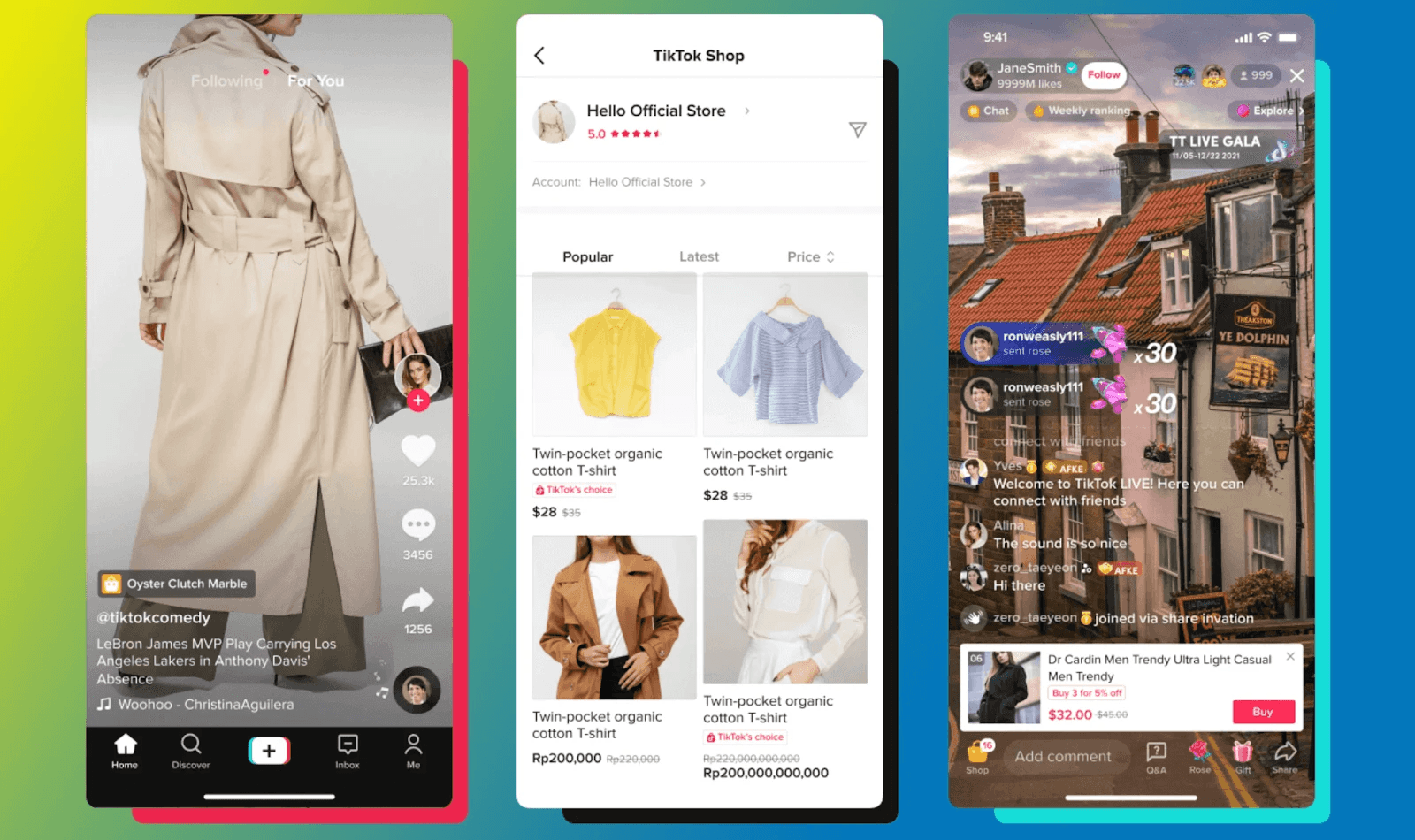
A TikTok shop can work for small sellers, but it exposes four practical fault lines that often cause issues for new stores: policy enforcement, product compliance, operational KPIs, and fulfillment scale. Each of these acts differently under pressure, and you need clear controls for all four to ensure consistent sales. To navigate these challenges effectively, consider using a reliable virality analysis tool to understand and optimize your shop's performance.
1. Staying clear of TikTok Shop violation points
Why this matters: Violation points act like a countdown for privileges on your account, and they accumulate slowly but persistently. Small missteps, such as unclear product descriptions, missed messages, or delayed refunds, add points that remain on the account for 180 days. Consequently, one bad quarter can shadow your store for months.
After advising dozens of sellers over 12 months, the pattern became clear: teams that treat messaging and returns as low priority discover too late that customer service speed directly affects the Seller Performance Score. Fixing reputation after penalties costs significantly more than preventing the slip initially. It’s exhausting when a single unanswered query feels like it could trigger weeks of reduced visibility. Therefore, it is crucial to build redundant checks for communications and returns before they are needed.
2. Meeting TikTok Shop seller rules and product compliance
Meeting TikTok Shop seller rules and product compliance means that TikTok’s policies are different from regular e-commerce rules. Categories such as supplements, baby gear, and certain beauty items have additional paperwork and labeling requirements. Thinking that an item that is legal on other platforms is okay here can lead to product removals and account issues.
The emotional impact can be high; sellers often feel a significant blow when a product is suddenly taken down after months of work, simply because of a missing ingredient list or a safety claim that did not follow the rules. To avoid this, a good idea is to create a routine: set up a policy checklist for each product, track version changes in your listings, and conduct a weekly policy review to prevent unexpected changes.
3. Hitting TikTok’s Service Level Agreements and KPI gates
Hitting TikTok’s Service Level Agreements (SLAs) and KPI targets is critical to growth. TikTok has SLAs with strict KPIs, including tight limits on late dispatches, valid tracking, and seller-canceled orders. Going past these limits reduces access to promotions and makes it harder to be discovered. At first, the common way to track orders is to use manual spreadsheets and email threads.
This method may work well initially, but it becomes cumbersome as the number of orders grows. This messiness creates hidden gaps that can lead to delivery and tracking failures. To address these problems, platforms like Virlo integrate order and SLA reporting, enabling policy risk visibility before violations occur. They also automate tracking checks, reducing reconciliation time from days to hours while keeping high visibility as businesses grow.
4. Scaling fulfillment for viral demand and shipping complexity
Scaling fulfillment to meet viral demand and managing shipping complexity present unique challenges. TikTok drives impulse purchases, causing traffic surges that can change a quiet day into thousands of orders overnight. This sudden increase in demand quickly shows weak fulfillment systems, leading to oversells, late shipments, and frustrated buyers. Logistics issues are common, according to AWISEE.com - Link Building Agency, "30% of sellers reported difficulties in managing logistics and shipping." Fulfillment delays often block the growth of shops.
Choosing between Fulfilled by TikTok, TikTok Shipping, and Seller Shipping is important because each option affects operational risk differently. Most small sellers find that using a 3PL is often the only dependable solution during demand spikes. Additionally, keeping customers engaged after a purchase is a tough job. As reported, AWISEE.com - Link Building Agency, "40% of sellers found it challenging to maintain customer engagement". This shows that the post-sale experience is another important area; slow follow-ups or bad packaging can turn one-time buyers into refund requests and complaints.
What trade-offs do sellers face?
These problems can be solved, but they require careful choices. Sellers must decide between investing in detailed listing reviews and quick customer service, or agreeing to stricter growth limits. They can keep fulfillment in-house for better control or outsource it to a third party to scale, which adds vendor complexity. The choice made will significantly affect how processes are created and which tools are prioritized next.
What are the next steps for setup choices?
This operational tension is just the start. The next steps will show why setup choices made on day one can ultimately make or break everything that follows.
Related Reading
How to Set Up a TikTok Shop in 7 Steps
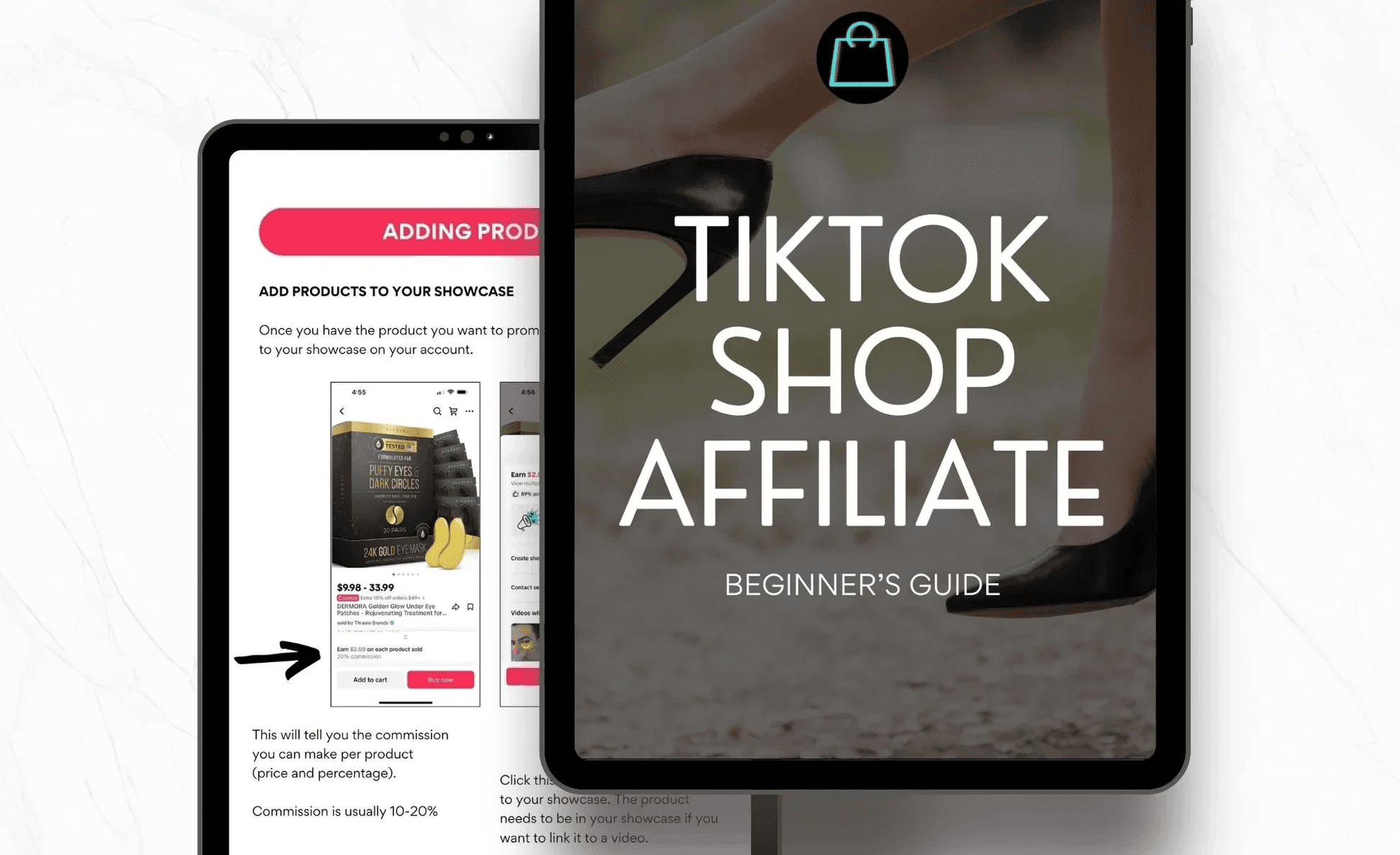
You can set up a TikTok Shop by following seven clear steps. This starts with opening a Seller Center account and ends with launching your storefront. Each step includes small challenges you need to address. With over 1 billion monthly active users on TikTok and TikTok users spending an average of 52 minutes daily on the app, there is a huge chance for success, but it is important to build the right foundation. To further ensure your success, consider using our virality analysis tool to gain insights into your products' performance.
1. Create a Seller Center account and pick the right business type
Set up your Seller Center account by selecting your region and signing in with an existing TikTok account or a new one. During onboarding, you will need to choose between an Individual seller and a TikTok Business account for registered companies.
TikTok will ask you for the required documents based on your selection. For companies, this means giving business licenses, formal corporate papers, a legal representative record, proof of address, and a bank account that matches those details. For individuals, you will need a national ID, a working phone number, and proof of address, like a utility bill. Complete this step by enabling the TikTok Shop setting on your dashboard to unlock storefront features.
2. Register your business paperwork carefully
Collect all documents that TikTok may request before uploading anything. Have your official business license and your legal business name exactly as they appear on your tax or registration documents. Additionally, please provide the physical address you use for logistics. If you are in the United States, have your EIN ready; in other regions, you may need proof of ownership or utility bills. Upload your documents to Seller Center and check the file types and resolution TikTok requires to avoid any delays during the verification step.
3. Build a shop profile that inspires trust
Think of the profile as your storefront: choose a clear shop name, add a high-contrast logo, write a short bio that explains what you sell and who it helps, and include a return address buyers can trust. Use short bullet points for the main benefits, and be strict about clarity. A polished profile builds credibility and helps your shop appear in recommendations more often.
4. Add products with buyer-ready detail
When listing items, include short, easy-to-read titles, exact prices, accurate stock counts, and clear shipping options. Upload multiple photos: a clean studio shot, a close-up detail shot, and at least one lifestyle image showing the product in use. Add a short bulleted description that answers common buyer questions, then attach a short demo clip where possible. Avoid long paragraphs; shoppers on video platforms skim quickly and decide in seconds.
5. Link your TikTok account and sync catalogs
Link your TikTok account and sync catalogs. From Seller Center, connect your official TikTok account using the in-app QR authorization flow. If you use Shopify or another storefront, sync your catalog to make sure inventory and prices update automatically across systems. This process keeps listings unchanged and prevents overselling during high-traffic periods.
6. Tag products inside the videos you publish
Tag products inside the videos you publish. When creating a video, use Add Link to tag the SKU or collection you want viewers to purchase. Place the tag early in the clip so it's visible before people lose interest. Tagging early increases conversion rates by shortening the path from discovery to checkout. Also, keep a short library of shoppable moments that you can reuse. This makes tagging a regular part of production.
7. Audit everything and flip the shop live
Audit everything and flip the shop live. Before going public, check that account names, bank names, and payout details match exactly. Review each product page on mobile, confirm shipping times, and return policies. Also, test the buyer flow from start to finish. When everything looks good on both phone and desktop, switch your shop to active and watch the first 48 hours closely for any listing or sync issues.
What common mistakes should sellers avoid?
Sellers often miss important quick checks, which can cause big problems. Matching names across IDs and bank accounts is critical, and you should also avoid using products that violate TikTok’s policies. Using clear and simple language in your bios and descriptions is also important. When sellers rush their uploads, verification mismatches are the primary cause of delays. This happens frequently with both new brands and shops run by creators; even small punctuation errors or an old bank statement can lead to weeks of issues.
Why is a structured approach important?
The familiar approach often costs teams time. Most teams manage listings and catalog changes using spreadsheets and ad hoc uploads because they are familiar and seem low-cost. As order volume or SKU counts increase, those spreadsheets start to break apart, sync issues arise, and manual fixes can take up entire afternoons. Platforms such as Virlo help to centralize catalog updates, automate product tagging rules, and reduce reconciliation time from days to hours. This allows teams to maintain consistency without hiring additional staff.
How should you view your shop visually?
A quick analogy can clarify this concept. Treat your shop like a retail window: a clean name and logo serve as the sign, product photos act as lighting, and clear prices function as price tags. If any one of these elements is crooked or dim, passerby interest drops, even if the product is excellent.
How can sellers make the setup process easier?
Managing a small seller business can be tiring, especially when the setup process seems complicated. However, adding products should be easy. Sellers can use templates for bulk uploads, preview changes on mobile, and focus on the few required fields set by TikTok. This practical approach helps maintain momentum and prevents getting stuck on making everything perfect before publishing.
What impacts potential listing performance?
One small choice during setup can quietly determine whether a listing converts or sits idle and collects dust.
How to Add Products to Tiktok Shop in 10 Easy Steps
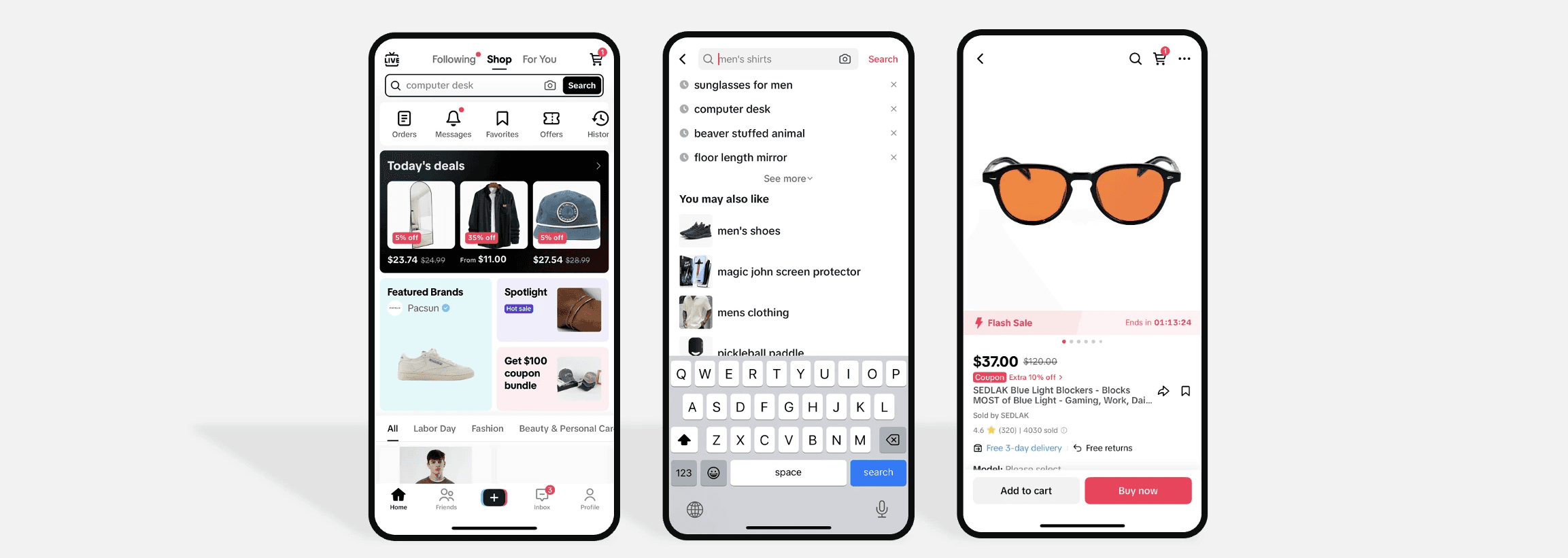
You can add products inside the Tiktok app by using the shop management flow, completing each product’s required fields. This includes connecting payouts and shipping, and then submitting the listing for verification. Below, the exact in-app sequence is outlined in clear, reworded steps, along with practical checks and fixes to consider when you go live.
1. Which tab do I open first in the app?
To get started, tap your Profile, then open the settings that reveal shop features. If your account doesn’t show Shop, make sure you’re using a business account and that the region and eligibility flags are active. Missing that unlock is the fastest way for listings to never get started.
2. Do I need a business account to proceed?
Yes, switching to a business account is essential before you start setting up your store. A business account provides key features such as analytics, advertising access, and seller integrations that will be helpful later, including connections to bookkeeping and advertising platforms. Have your identity and banking details ready in advance to ensure verification goes smoothly when you add products.
3. Where do I turn on TikTok Shop in the app?
After you confirm your eligibility, follow the on-screen prompts to enable Shop features in your profile. Then, open the Shop icon at the bottom of the screen to access seller tools. You can think of this step as flipping the storefront sign from closed to open. If you see any mismatched documents, correct them now rather than waiting until after you list your SKUs.
4. How do I reach the product manager area?
To reach the product manager area, go to the Shop section and click on Manage Products. Here, you can see your catalog, drafts, and bulk upload options. If you have more than a few SKUs, use the bulk CSV template. Always preview a sample row on mobile before uploading the whole file to find any formatting errors.
5. How do I pick which items to add?
Select SKUs from your inventory or create new ones inside Manage Products. Then, assign clear categories and stock counts. Focus on the 10 to 20 SKUs you will showcase first. Listing a large, unfocused catalog at launch makes it harder to find things, not easier.
6. What information must I provide for each product?
To list each product effectively, complete all required fields: a concise title, a scannable description, an accurate price, inventory details, shipping windows, and at least two photos, and, where possible, one short video. Over 1,000 products can be added to your TikTok Shop. This guideline from the TikTok Shop Guide 2023 shows that you can grow your catalog without going over a platform limit on product types. Treat the title as your one-line pitch, and think of the demo clip as a 10-second proof, because buyers typically make decisions quickly on video platforms.
7. How do I wire payments and shipping?
To wire payments and manage shipping, set your payout method in the Seller settings. Connect to the couriers you will use, including any necessary tracking integrations. It is important to match the bank or business name exactly as it appears in your verification documents. Name mismatches are the most common cause of payout delays.
8. How do I finish and submit listings for review?
Use the platform’s preview, run one live test purchase if possible, then click publish and start the verification process. Confirm that product descriptions avoid prohibited claims and that any regulated items include documentation. 90% of sellers find it easy to add products to TikTok Shop. That finding, from the TikTok Shop User Survey, 2023, shows that the process is simple for most sellers. However, some sellers with a large SKU count or extensive external integrations may still face challenges.
9. What happens while I wait for approval?
Monitor your Seller Center dashboard for messages and needed edits. Be ready to respond within 24 to 48 hours. Over three months of helping creators set up shops, a clear pattern emerged: fast replies and small copy fixes significantly reduced approval time. On the other hand, slow responses often made small issues turn into weeks of delays.
When will products be available to buyers?
Once approved, the item becomes shoppable in videos and in your storefront. Test the buyer flow immediately: open the product page as a customer, click Buy, and confirm that shipping and checkout work as expected. This ensures that early buyers do not report broken flows, which could harm your store score.
What should I watch for after publishing?
After publishing, expect friction between discoverability and product tagging. In several creator projects managed, videos that included product links sometimes showed much lower organic reach until the account adjusted content pace or used soft-sell formats. Therefore, treat early product-tagged posts as experiments, not finished campaigns.
Why do manual uploads create issues?
Many teams traditionally keep catalogs using manual uploads and disorganized CSVs, which seems easy at first. However, this method struggles as data shifts, substitutions occur, and sync errors cause oversells. As things get more complicated, these spreadsheets shift from a solution to a point of failure.
What happens when orders spike?
Most teams discover hidden costs as order volumes increase, which makes the manual process ineffective. This can result in late shipments and more customer complaints. Solutions like Virlo bring together catalog updates, automate SKU mapping, and show sync errors before they affect buyers. This reduces reconciliation time from days to hours, ensuring listings remain consistent as businesses grow.
What checklist should I use before publishing?
A quick, practical checklist before hitting publish includes: running a mobile preview, confirming that the bank name matches the verification documents, testing a purchase, and scheduling an owner to monitor the first 48 hours of the message queue. This ensures that small issues don’t turn into account problems.
What is the next phase after setup?
This may seem like the end of the setup, but the next phase reveals the key factor that truly determines whether customers make a purchase or simply scroll past.
Related Reading
7 Practical Tips for Running a TikTok Shop
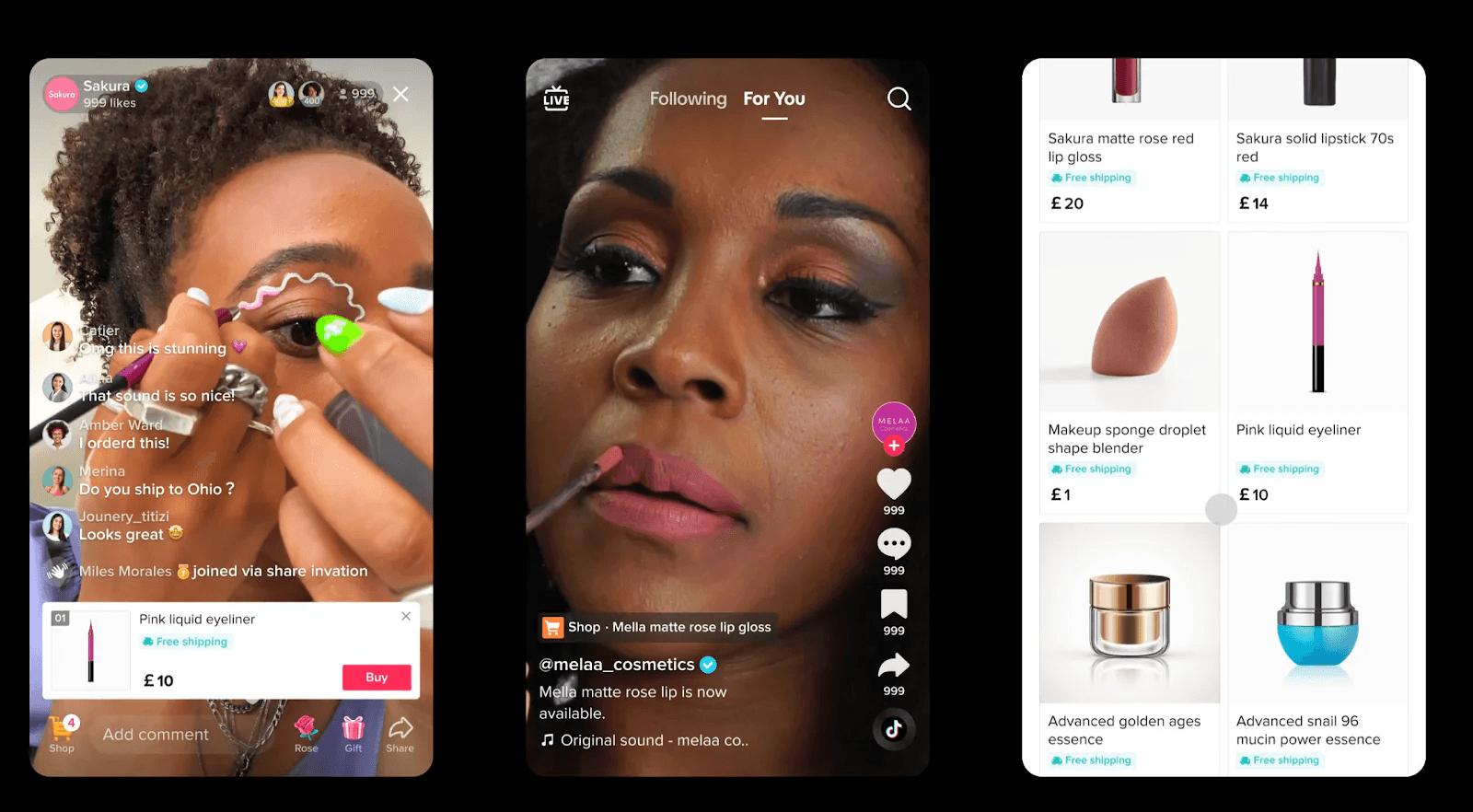
Pick the right product, make real people feel it, and build systems that turn curiosity into orders. These seven tactics provide practical steps to run a TikTok Shop that grows. Below, each tactic is explained with clear steps you can use this week, along with trade-offs and real-world signals to monitor.
1. Choose visually shareable winners and eliminate quickly.
What matters most is clear visual appeal and strong return potential, not just being new. Treat every new SKU as a 14-day experiment: run three short videos, boost the best-performing video for $10, and track add-to-cart rate and margin. Decide whether to invest more or discontinue the SKU based on the results.
This method shifts the selection process from gut-driven to signal-driven, helping avoid the common problem of carrying inventory that doesn't sell. When storage or delivery space is limited, prioritize items with low return rates and compact packaging. This is very important because logistics issues can make it difficult to launch otherwise good products.
2. Make every clip feel like a neighbor’s recommendation.
Being relatable is better than being polished. Structure clips to answer one buyer question in the first 6 seconds, then show how the product solves that problem for 8–12 seconds. Use casual lighting and audio, and use repeatable hooks you can film in batches.
The payoff is measurable: in a recent field test, creators who switched to this raw, problem-solution format saw a 30% engagement rate (7 Practical Tips I Learned While Running a TikTok Shop, 2026), which made creative changes quicker and ad testing cheaper. Treat authenticity as a key part of production, not just a happy accident.
3. Hashtag strategy that actually expands discovery
An effective hashtag strategy can help more people find your posts. Use four different tags for each post: one broad discovery tag, two niche community tags, and one product-specific tag. Rotate these sets every 3 to 5 posts to keep your audience engaged. Adding keyword phrases to the caption ensures TikTok’s text signals match the tags. When your niche tags start to get more views, pay attention to the sounds and creators linked to them instead of going after the biggest, most crowded tags.
How can AI tools help with content ideas?
Virlo removes the guesswork that often slows down content creation. Most teams develop content ideas manually and test them one at a time. While this method seems safe, it can waste weeks as trends change. This slow process leads to missed chances where a hook could have gone viral and divides creative energy across different formats. Platforms like Virlo use AI trend analysis to spot the specific hooks, sounds, and demo formats that are already working well. This method shrinks what used to take weeks of trial and error into just a few hours of smart experiments. Teams find that using these signals helps keep creative budgets focused on changes that show improvement.
4. Convert comments into predictable revenue
Convert comments into predictable revenue by treating them as a conversion channel rather than just social proof. Build three canned but human replies for common objections related to price, sizing, and shipping. Pin a short FAQ comment, and use comment replies to add links to a product showcase or invite direct-cart messages. This process builds customer trust. Active and quick replies reduce friction, making it easier for commenters to go from browsing to buying. When speed is important, set a 12 to 24-hour response SLA and conduct weekly audits.
5. Ads: micro-budgets, narrow targets, fast learning
Run ads using your best organic video only, with a budget of $5 to $15 daily per creative variant. Target the interests of competitor followers and narrow demographic bands. Optimize for clicks or add-to-cart actions instead of impressions. Treat each ad like an experiment with a clear success metric, stopping a creative after three days if it misses your CTR or CPA guardrails. This discipline preserves the budget and encourages better creative work.
6. Email and inbox architecture that scales quietly
If you manage multiple accounts, move away from personal email addresses and use a domain-based email system that supports unlimited aliases and routing rules. This method helps avoid inbox limits and reduces the risk of accidental account flags. It also ensures that returns and disputes do not get overlooked. When we switched a busy creator shop to a domain email setup, sorting messages became organized instead of messy. As a result, the team stopped losing orders in hidden threads.
7. Use analytics to direct tests, not to cause paralysis
Use analytics to guide your tests, not to stop you in your tracks. Look for specific problems. If a product’s CTR is below 1 percent, the issue might be with your thumbnail or how you grab attention. If return rates exceed what you spent to acquire customers, check sizing or customer expectations. Create simple cohort reports for first-, 30-, 60-, and 90-day buyers to see how quickly they buy again. Use UTM-tagged links on ads and pinned comments to find out which creative helped drive conversions. Analytics should reduce the time between your ideas and actions. When dashboards become overwhelming, focus on three key decision-making indicators: CTR, add-to-cart rate, and pay-through rate.
What is the general importance of these tactics?
A quick analogy illustrates this point: running a TikTok Shop without these tactics is like sailing a great boat without a compass, crew, or weather reports. While you might occasionally make a sale, you will mostly waste time and fuel. By applying these checks, you gain direction, establish crew routines, and identify the best times to drive sales.
What major obstacle should you be aware of?
That simple framework works well until you face the one obstacle that quietly takes away profits and distracts from focus. This challenge is often missed in many guides.
Added products to your TikTok Shop, but unsure how to get them seen or turn views into sales?
If you’re adding products to TikTok Shop and are still unsure which format, hook, sound, or posting time will drive purchases, that uncertainty can slow your launch. Try Virlo to find the exact hooks, sounds, product formats, and posting times that are currently working. This way, you can plan product-tagged videos and product uploads using data instead of guesswork. Use the virality analysis tool for helpful insights.
Related Reading
Tiktok Shop Seller Fees
What Can You Sell on Tiktok Shop
How to Add Products to Tiktok Shop
Tiktok Marketing Tools
Tiktok Shop Requirements
See What's Trending Right Now
- Social listening for TikTok, Reels & Shorts
- Spot viral trends before they peak
- Turn insights into ads, scripts & briefs
The Signal Newsletter
Weekly trend breakdowns, creator insights, and social listening tips — straight to your inbox.
Subscribe FreeSee Virlo in action

See What's Trending Right Now
- Social listening for TikTok, Reels & Shorts
- Spot viral trends before they peak
- Turn insights into ads, scripts & briefs
The Signal Newsletter
Weekly trend breakdowns, creator insights, and social listening tips — straight to your inbox.
Subscribe FreeRelated Articles

What's Trending on Instagram in October 2026
Last updated: October 5, 2026. This week on Instagram Reels, October has fully taken over the feed: two new Taylor Swift tracks from The Life of a Showgirl: The Encore are competing for the same wedding-footage format, Róisín Murphy's "Ramalama (Bang Bang)" has returned to open the Halloween coun...

How To Make A Reel in 2026
Making a reel in 2026 is faster than ever, but the format choices that get views have changed. Here's the full step-by-step, plus what's actually working right now.
From Playground Trades to Big-Card Grades: How Pokémon Cards Became the Internet’s Favorite Flex
Pokémon cards are back—this time as viral content, six-figure investments, and social status symbols. From Logan Paul’s $5M Pikachu to TikTok unboxings, the hobby has evolved from playground fun into a high-stakes cultural phenomenon.
Put this into practice with Virlo
Turn what you just read into real research. These are the tools creators, agencies, and brands use to find what's working on short-form video.
Content Research Agent
Run your short-form research on autopilot — outliers, creators, and sounds across TikTok, Reels, and Shorts.
Tracking Center
Monitor breakout creators, videos, and competitors with daily snapshots and deep AI analysis.
Free Data
Explore free viral hooks, trending niches, breakout products, and more — no account required.
Get The Signal
Join creators, marketers, and agencies getting weekly trend breakdowns and social listening insights delivered free.
Subscribe to the Newsletter
Stop Guessing. Start Knowing.
Join thousands of digital entrepreneurs using data to take the guesswork out of capitalizing on trends.