Use Raycast AI with an MCP server for TikTok research
Updated
Virlo is social listening for TikTok and Instagram Reels. Raycast AI answers in a keystroke, but it cannot tell you which TikTok or Instagram formats are blowing up today. Install Virlo with the Install MCP Server command, @-mention it in AI Chat, and Raycast can pull trends, sounds, hooks and outliers from a database of 23.1M viral videos. Raycast is a launcher for Mac and Windows that bundles extensions, AI Chat and Quick AI, and connects to MCP servers over stdio or HTTP.
- Install MCP Server form, HTTP transport, dynamic sign-in
- @virlo in AI Chat or Quick AI, or the Ask Virlo command
- Read-only tools Raycast approves by default
Part of Virlo's AI assistant guides. Prefer a full chat app? See Claude or ChatGPT.
How do I add an MCP server to Raycast?
Raycast has a built-in form for MCP servers. Virlo is a hosted HTTP server, so there is nothing to install locally.
Step 1: Create your Virlo account for free
Step 2: Run Install MCP Server
Open Raycast, search for the Install MCP Server command and press Enter. You can also open Manage MCP Servers and use its Install New Server action.
Step 3: Fill in the form
Name the server virlo, since that is what you will @-mention. Set Transport to HTTP, paste the Virlo URL and choose dynamic OAuth. Press Install MCP Server (⌘↵) to save and connect.
Install MCP Server formName: virlo Transport: HTTP URL: https://dev.virlo.ai/api/mcp/mcp OAuth Type: DynamicStep 4: Approve the sign-in
Raycast registers itself with Virlo using dynamic client registration and PKCE, then opens the Virlo approval page. Once you approve, Manage MCP Servers lists virlo as Running with its tools.
Step 5: Mention @virlo in AI Chat
Open AI Chat or Quick AI, type @virlo and ask. Only mentioned servers join the conversation, so the @ is what brings Virlo in.
Your first prompt@virlo what are the top trends to copy on TikTok this week for [your niche]? Give me what to keep and what to change for each.
Root Search also gains an Ask Virlo command after install, so you can jump straight into a Virlo question without opening AI Chat first.
Dynamic OAuth vs HTTP header vs stdio bridge: which Raycast setup?
| Setup | Form fields | Sign-in | Pick it when |
|---|---|---|---|
| Dynamic OAuth (default) | Transport HTTP, URL, OAuth Type dynamic | Virlo approval page; token stored encrypted per server | Almost always |
| HTTP header | Transport HTTP, URL, HTTP Headers with Authorization = Bearer virlo_tkn_... | API key sent on every request | You would rather keep a key than a login |
| stdio with mcp-remote | Transport stdio, Command npx, Arguments -y mcp-remote plus the URL and header | API key passed through the bridge | You standardise every server on stdio |
Keys start with virlo_tkn_ and are created on Virlo API Keys.
Where Virlo shows up inside Raycast
| Raycast surface | How you reach Virlo | Good for |
|---|---|---|
| AI Chat | Type @virlo in a chat | Longer research threads and follow-ups |
| Quick AI | @virlo straight from Root Search | One-off questions like "top sound this week" |
| Ask Virlo command | Search "Ask Virlo" in Root Search | Jumping into a Virlo question with no setup |
| AI Commands | Reference Virlo in a saved AI Command | A repeatable weekly trend check |
What does a trend recipe look like when you @-mention Virlo in Raycast?
This is the live data behind an @virlo answer: each trend to copy, the part that has to stay the same, the part you make your own and how many creators posted it this week.
In Virlo's data, the trend to copy with the most creators this week is "My moon my man couple montage": 659 creators posted it in the last 7 days, as of November 19, 2026.
As of November 19, 2026 at 13:07 UTC
| Trend | Keep the same | Make it yours | Creators this week |
|---|---|---|---|
 My moon my man couple montage | The song 'My Moon My Man' by Feist (often a specific remix or cover) and the theme of showing a romantic partner. | The specific person or couple being shown and the setting of the clips. | 659 |
 While they're out partying btw | The on-screen text 'While they're out partying btw' and the rhythmic breathing audio. | The activity being performed, such as gaming, working at a fast-food restaurant, or training. | 346 |
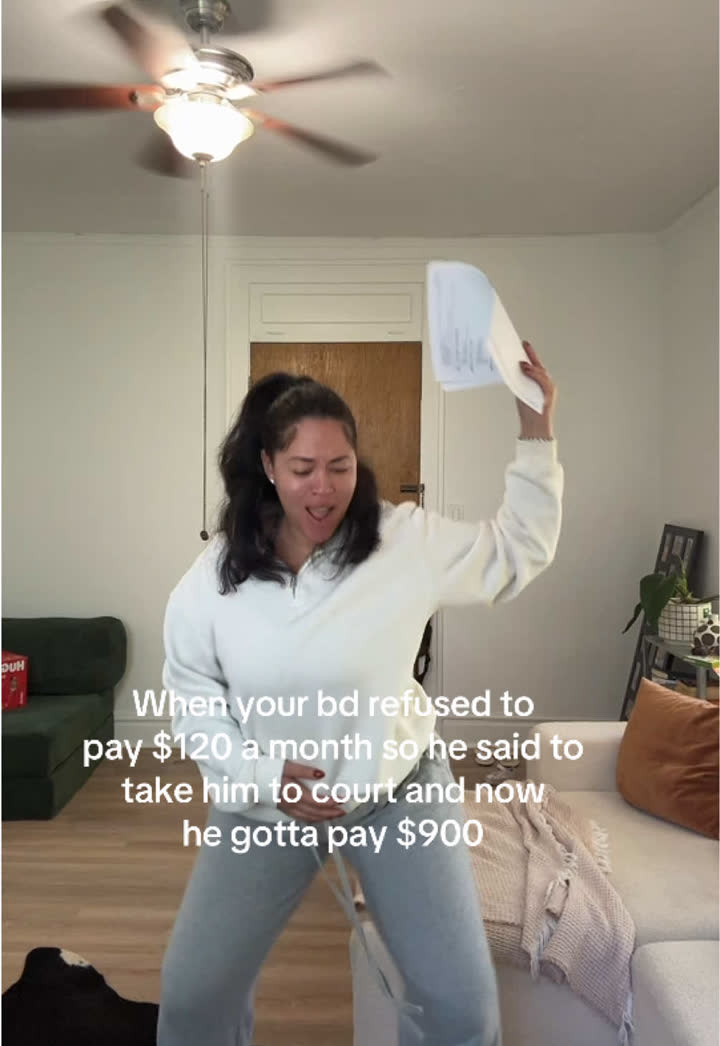 He wanna pay full price SNL trend | The audio 'He wanna pay full price' from an SNL skit featuring Druski. | The relatable situation described in the on-screen text, such as child support, birthdays, or family vacations. | 175 |
 But you're not a Buddhist trend | Audio of Bobby and Peggy Hill: "But you're not a Buddhist." "Yes, I am, mom." "Honey, you're not from China." | The specific hypocritical or contradictory situation described in the on-screen text. | 158 |
 Shoulder carry mirror selfie trend | Carrying someone over one shoulder while taking a mirror selfie to the same audio. | The couple, their outfits, and the room where the selfie is taken. | 158 |
See the recipe for all 39 trends to copy
Every trend with its example videos, 30-day chart and client fit is in the Virlo app.
Open Trends to copyHow this sample is made
- Source
- Virlo's Trends to copy: formats found by Virlo's trend detector and published only after the team checks each one.
- Window
- Creators who posted each trend in the last 7 days, counted from TikTok and Instagram videos only. Trends made with an AI tool are left out.
- Method
- Ranked by creators posting this week. Stages: Fresh, Rising, Peaking, Fading.
- As of
- November 19, 2026 at 13:07 UTC. Refreshes every hour.
- Made by
- Numbers are pulled automatically from Virlo's data every hour; the text around them is written by the Virlo team.
Suggested citation: Source: Virlo, “Use Raycast AI with an MCP server for TikTok research”, virlo.ai/raycast
A Raycast routine for busy marketers
Raycast is built for speed, so Virlo fits the small questions you ask many times a day. Keep a few of them as AI Commands and your research turns into a couple of keystrokes:
- Morning check: "@virlo what new trends to copy appeared in [your niche] since yesterday?"
- Before a shoot: "@virlo which Instagram Reels sounds are breaking out right now?"
- Before a meeting: "@virlo what did @[competitor] post this month that beat their usual views?"
- While writing: "@virlo give me five hooks from videos scoring 18+ in [your niche]."
Because Virlo's tools only read data, Raycast's default permission setting approves them without extra prompts.
Why ask Virlo from a launcher instead of a dashboard?
Most trend questions are small and frequent: one sound, one competitor, one hook. Opening a dashboard for each of them breaks your flow, while a Raycast hotkey and an @-mention answer in the same few seconds it takes to think of the question.
Raycast also lets you add Custom Instructions and a Description when you install a server. Use them to tell Raycast AI how you like Virlo answers, for example "always include the video link and Virality Score" or "focus on [your niche] unless I say otherwise", so every reply comes back in the shape you want.
When a quick answer turns into a bigger project, the same Virlo account works in Claude, ChatGPT and coding agents, so you can move the research into a longer session without setting anything up again.
What can I ask Raycast AI with @virlo?
Type these in AI Chat or Quick AI after installing the server. Replace the brackets.
Trend recipes
@virlo list this week's trends to copy for [your niche] with the part to keep and the part to make mine for each.
Sound pick
@virlo which sounds are breaking out on Instagram Reels and TikTok this week, and which fit [your brand]?
Competitor glance
@virlo show the three videos from @[competitor] that beat their usual views the most, with links.
Hook ideas
@virlo give me 10 hooks from [your niche] videos with a Virality Score of 18 or more, grouped by hook type.
Transcript
@virlo get the transcript of [TikTok link] and rewrite the first five seconds for [your product].
Hashtags
@virlo which hashtags around [topic] are growing fastest this week?
Daily check
@virlo what changed in [your niche] trends since yesterday? Keep it to five bullets.
Caption help
@virlo find two outlier Reels about [topic] this month and draft a caption for my next post in the same style.
Raycast AI vs Raycast extensions vs Raycast MCP Server: which is which?
Raycast uses MCP in two directions and also has an extension store. Here is how they differ.
Raycast AI with an MCP server (this page)
Raycast acting as the client: you install Virlo with Install MCP Server and @-mention it in AI Chat.
Raycast extensions
Add-ons from the Raycast Store, built with Raycast's own API. Virlo connects through MCP instead, so no extension is needed.
Raycast MCP Server
Raycast exposing itself to other AI apps. It is off by default and is the opposite direction from this guide.
Claude and ChatGPT
Full chat apps that connect to Virlo too, through a connector or app; see their guides.
What are the limits?
- Virlo reads public TikTok and Instagram data and never posts or logs in to social accounts, whatever you ask Raycast.
- MCP servers run through Raycast AI, so AI needs to be switched on in your Raycast account; manage servers from Manage MCP Servers.
- A server joins a conversation only when you @-mention it, so start each chat with @virlo.
- Trends to copy refresh hourly after a check by the Virlo team; Raycast on iOS supports HTTP servers like Virlo.
- Virlo plans are listed on pricing.
Frequently asked questions
How do I add an MCP server to Raycast?
Search Raycast for the Install MCP Server command, or use Install New Server inside Manage MCP Servers. Fill in a name, choose stdio or HTTP as the transport, add the URL or command, then press Install MCP Server. For Virlo, use HTTP with dynamic OAuth.
Does Raycast support remote MCP servers?
Yes. Raycast supports stdio servers and HTTP servers, including Streamable HTTP. HTTP servers can sign in with dynamic OAuth, static OAuth or headers, and on iOS only HTTP servers work. Virlo is a hosted HTTP server, so no local bridge is needed.
How do I use an MCP server in Raycast AI?
Type @ followed by the server name in AI Chat or Quick AI, for example @virlo, then your question. A server that is not mentioned stays out of the conversation. Raycast also adds an Ask command for each server to Root Search.
Can Raycast AI see TikTok trends?
With Virlo installed, yes. Mention @virlo and ask for trends to copy, trending or breakout sounds, hashtags, hook types or outlier videos on TikTok and Instagram, and Raycast answers with real data and links to each video. Follow-up questions in the same chat keep using Virlo.
Is there a Raycast extension for Virlo?
You do not need one. Virlo connects to Raycast as an MCP server through the Install MCP Server command, which gives Raycast AI all of Virlo's research tools without installing anything from the Raycast Store. MCP servers sit alongside your extensions and are managed from Manage MCP Servers.
Can I use a Virlo API key in Raycast?
Yes. In the Install MCP Server form, leave OAuth off and add an HTTP Header with the key Authorization and the value Bearer followed by your Virlo key, which starts with virlo_tkn_. Raycast sends that header with every request and stores it with the server's other settings.
Does Raycast ask permission before calling Virlo?
Raycast tools follow its Permissions setting, which by default approves read-only tools and asks about everything else. Virlo's tools only read data, so they usually run without extra prompts. You can tighten that setting if you want Raycast to confirm every call, including Virlo's.
What is the Raycast MCP Server?
It is Raycast offering its own commands to other AI apps over MCP, the reverse of this guide. It is off by default, and apps connected to it rely on their own approval settings. Installing Virlo makes Raycast the client instead, so you only need the Install MCP Server command.
Can Raycast post to TikTok through Virlo?
No. Virlo is read-only research on public TikTok and Instagram data and never logs in to social accounts. Raycast can answer, summarise and draft captions or scripts with it, but posting the finished video stays with you and whichever app you publish from.
Ask Raycast what is going viral
Install Virlo once, type @virlo, and get TikTok and Instagram answers in a keystroke.
More AI assistant guides
- AI assistant guides
- Claude
- Claude Code
- Cursor
- MCP server
- TikTok MCP server
- Instagram MCP server
- ChatGPT
- ChatGPT dots
- OpenAI Codex
- Gemini CLI
- Grok Build
- Claude Cowork
- n8n
- Zapier
- Grok Bot
- Muse
- Claude Duet
- Hermes Agent
- Kimi K3
- Cue
- Manus
- Perplexity Computer
- Paperclip
- OpenClaw
- NanoClaw
- DeepSeek
- AI agents CLI
- ChatGPT agent
- Perplexity
- Microsoft Copilot
- Le Chat
- Notion
- Slack
- Discord
- Telegram
- Google Sheets
- Windsurf
- VS Code
- GitHub Copilot
- Cline
- JetBrains
- Kiro
- Google Antigravity
- goose
- Warp
- OpenCode
- Zed
- Amp
- Factory Droid
- Lovable
- Replit
- Bolt.new
- v0
- Ollama
- LM Studio
- Open WebUI
- LibreChat
- Make
- Pipedream
- Gumloop
- Lindy
- Relevance AI
- Airtable
- ClickUp
- Dify
- Flowise
- LangChain
- CrewAI
- OpenAI Agents SDK
- Mastra
- Vercel AI SDK
- Claude Agent SDK